

If you work in the software and systems engineering space, you likely understand that managing dependencies across multiple components and requirements is critical for project success. Unfortunately, specifications can be difficult to track, and dependencies hard to visualize. Automation can make these components much easier to manage. Specifically, PTC Codebeamer’s newest advancements allow users to automatically resolve dependencies. Let’s explore how Codebeamer’s capabilities can reduce issues, avoid costly delays, and ensure smooth project progress.


Dependency Management Challenges
A dependency is a relationship between two or more items where the status, content, or calculation of one item relies on the other. These are often requirements, tasks, or computed fields. For example, if you have a computed field that calculates a value based on other fields, these referenced fields are its dependencies. Dependencies indicate that changes in one item will impact another, helping teams manage these connections. This interconnectedness is essential for tracking progress and ensuring compliance with specifications. Unfortunately, dependencies also bring complexity. When dependencies are not actively monitored and resolved, projects can experience delays, increased costs, and quality risks.
How Codebeamer Automates Dependency Visualization
Codebeamer resolves the issue of dependencies as hidden complexities by instead addressing them as visual elements. Team members can easily monitor and address them through computed fields. These fields can incorporate references to other fields in their formulas and are recalculated whenever a dependency changes. This makes it possible to instantly see the impact across items.
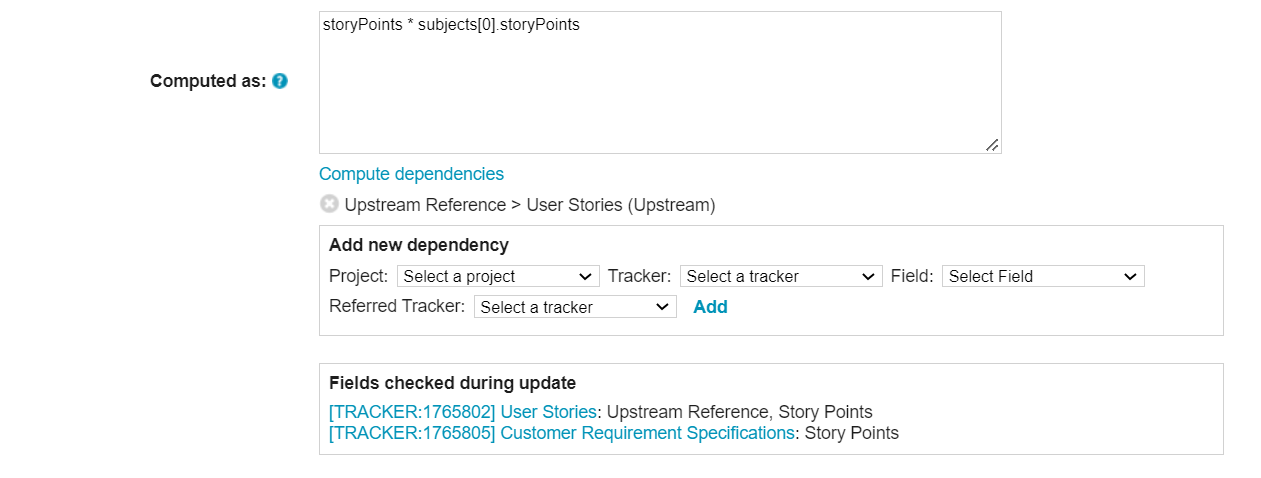
Codebeamer’s newest update has automated the recalculation to occur whenever an item dependent on the formula is updated. It does this by internally tracking the dependencies of each computed field and linking them directly to the relevant project elements. Additionally, teams can access a “Compute Dependencies” link that provides a full breakdown of the dependencies associated with each computed field. This link displays dependencies such as the trackers that feed into each computed field formula. This allows teams to visualize the relationship between different project components, ensuring the project is not impacted by unintentional changes.
Key Features of Dependency Tracking in Codebeamer
As previously mentioned, computed field values are updated when the item itself is modified as well as when a dependent item changes. Codebeamer also has a few additional features that help with dependency tracking. The “Compute Dependencies” feature parses formulas to display all associated dependencies. This feature is essential for comprehending complex relationships between items and ensuring that updates spread seamlessly through dependent fields. Furthermore, Codebeamer allows users to manually add dependencies. This is helpful for formulas with complex dependencies and ensures dependencies are documented and monitored effectively even if an automation error occurs. Codebeamer also offers immediate update notifications. When tracked fields change, dependencies are automatically recalculated. This allows teams to instantly understand the effects of any update and promotes more effective impact analysis.
Benefits of Automated Dependency Visualization
Automated dependency visualization offers many benefits.
1. It enables teams to identify risks earlier. This helps reduce expensive rework and delays.
2. Better visualization also helps teams make better decisions. They can prioritize work based on the impact of each item.

3. It helps project managers efficiently allocate resources. By understanding which dependencies are crucial for ongoing work, project managers can ensure that high-impact items are addressed quickly.
4. It helps drive engineering innovation. Due to engineers not having to continually confirm dependencies are in place, they can spend that time innovating and finding better outcomes for the products they are developing.
Automate Dependency Visualization in Codebeamer
Codebeamer’s automated dependency visualization transforms how teams manage complex relationships between project components. By dynamically tracking dependencies, Codebeamer enables teams to resolve dependency issues before they impact project timelines or budgets. If your organization is interested in minimizing risks and having better project predictability, Codebeamer can help. Contact us today to learn more about Codebeamer’s automation capabilities or to see a demo.