


Key Takeaways
- JSM brings service management discipline to HR. Jira Service Management gives HR and operations teams a self-service portal, structured request types, approvals, SLAs, and automation in one platform.
- Atlassian’s HR templates are a fast starting point. Prebuilt templates for HR service management, onboarding, recruitment, and performance reviews help teams launch quickly, then customize.
- Automation removes manual handoffs. One approved request can trigger every task across IT, facilities, payroll, and security, replacing scattered tickets, emails, and spreadsheets.
- Real results come from process design, not just configuration. SPK helped a financial services company turn onboarding, transfers, and exits into a single approval-driven workflow.
HR and operations teams get the same structured, automated service delivery IT teams have relied on for years with Jira Service Management (JSM). Instead of managing employee requests through email threads, spreadsheets, and hallway conversations, teams can handle onboarding, offboarding, policy questions, and internal operations requests through a self-service portal. Furthermore, JSM offers standardized request types, approval workflows, and automation to streamline processes.
This shift to enterprise service management is particularly important for processes that span departmental boundaries. One new employee can involve HR, IT, facilities, payroll, and security. When each team is tracking its own piece, steps get missed, employees wait, and leaders lose visibility. Here’s why JSM fits HR and operations, and how we helped one organization automate its employee lifecycle.

Jira Service Management HR Templates
One of the great things about JSM for HR teams is that Atlassian offers a library of human resources templates to give HR teams a jump-start with proven structures, rather than building from scratch. Each template comes with pre-defined work types, workflows, and fields that teams can tailor to their policies.
- Human resource service management. The anchor template for HR service delivery. It deals with employee requests, onboarding, and offboarding through a help center portal with queues, SLAs, and a knowledge base all powered by Jira Service Management.
- New employee onboarding. Coordinates everything that occurs from an accepted offer to an employee’s first day, including equipment and accounts, as well as orientation tasks.
- Recruitment. Follows candidates through the hiring process, providing recruiters and hiring managers with a shared view of the pipeline.
- Performance review. Adds consistency to the review cycles so that all managers follow the same steps and timelines.
- Project management. Supports larger HR and operations efforts like benefits enrollment, policy launches, and office relocations.
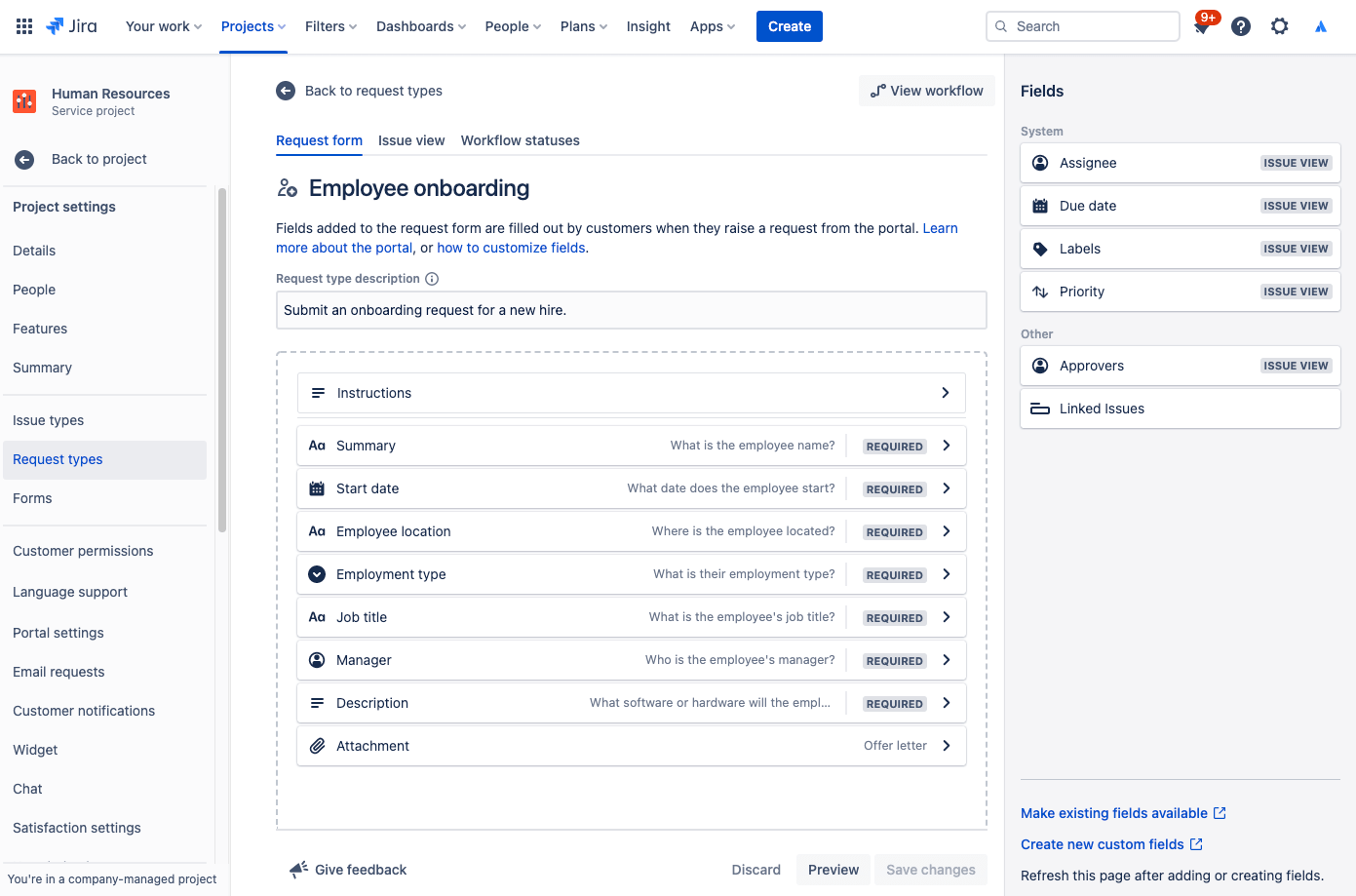
The HR service management template is based on Jira Service Management, while the other templates are Jira work management templates. Many organizations combine these, using JSM as the front door for employee requests, and Jira projects to manage the work downstream. However, templates are just the beginning. The real value comes in customizing workflows, approvals, and automation rules to how your organization actually works.
Why Use Jira Service Management for HR
HR and operations teams handle a steady stream of requests that are repetitive, time-sensitive, and often confidential. Jira Service Management is built for exactly that kind of work.
- One front door for employees. A branded help center portal gives employees a single place to submit requests, check status, and find answers in a connected Confluence knowledge base. That means fewer emails and status-check messages to HR.
- Standardized forms. Request forms capture the right information up front, whether it’s a new hire, a leave question, or an equipment change, so teams spend less time chasing details.
- Built-in approvals. Sensitive actions such as onboarding, role changes, and terminations can only be started by authorized managers or HR staff.

- No-code automation. Automation rules create subtasks for IT, facilities, and payroll, assign owners, send notifications, and update statuses, removing manual handoffs and inconsistent steps.
- Reporting and SLAs. Service level targets and dashboards show how quickly requests are handled and where bottlenecks form, giving HR leaders data instead of anecdotes.
- Confidentiality and security. Granular permissions and restricted request types keep sensitive employee data visible only to the people who need it, supporting audit and compliance requirements.
- One platform with IT. Many organizations already run IT service management in JSM, so putting HR and operations on the same platform makes cross-department workflows much easier to connect.
- AI assistance. Atlassian’s AI capabilities, including Rovo, help employees find answers on their own and help agents summarize and route requests faster.
SPK then employed an agile, sprint-based approach to design and deliver:
- An HR automation pipeline that drives onboarding, transfers, and exits from one master request submitted via the JSM portal.
- Workflow-based approval so that only authorized personnel can initiate employee lifecycle actions.
- Automation rules to create and route the downstream tasks needed by each department to complete their work instead of manual ticket creation.
- A change control and risk management system in the same Jira environment to improve compliance and auditability.

The financial company’s teams lived in Jira every day, so SPK built and tested the work in a sandbox and scheduled the production cutover for off-business hours. This prevented employees from being interrupted by notifications when new workflows came online.
The results
- One request instead of multiple. Instead of many tickets created by hand over different departments, an employee’s transition now starts from one approved ticket.
- Fewer manual and inconsistent steps. Automation means that all necessary tasks are created and assigned every single time.
- Better communication and visibility. HR and support teams can view the status of all onboarding, transfers, and exits in one place.
- Stronger governance. The organization’s compliance and audit readiness are improved by approval gates and change control, which are critical factors in regulated financial services.

The success of the project resulted in a follow-on engagement for ongoing Jira administration and enhancements as the organization’s teams and processes keep evolving.
Can Jira Service Management be used for HR?
Yes. Jira Service Management works well for HR and operations teams, giving them a self-service portal, standardized request forms, approvals, SLAs, and automation for processes like onboarding, transfers, and offboarding. Atlassian’s HR templates provide a fast starting point, and teams can customize workflows to match their own policies.
Two practical points come up often. First, licensing: only the HR staff who work requests need agent licenses, while employees submitting requests through the portal do not. Second, confidentiality: keeping HR in its own service project, restricting who can see sensitive request types, and applying issue-level security keeps employee data visible only to the people who need it.
As the financial services company example shows, the biggest gains come from redesigning cross-department processes around a single, governed request, not just from turning on templates.
SPK and Associates is an Atlassian Gold Solution Partner that helps organizations extend Jira Service Management beyond IT into HR, operations, and enterprise service management through our Atlassian Application Management. From workflow design and automation to ongoing Atlassian Application Management, contact SPK to start automating your HR and operations workflows.