
Speed and efficiency are no longer optional when developing products. They are critical differentiators. However, delivering high-quality designs fast while minimizing errors, rework, and costly delays puts engineering teams in a predicament. At the heart of this challenge lies the effective use of CAD workflows. When properly structured and integrated with downstream systems like PLM, PDM, and ERP, CAD workflows can dramatically accelerate innovation. Furthermore, they help streamline operations, compliance, and more.
This blog explores essential CAD workflows that we’ve seen streamline product development. It also highlights how integrating CAD with PLM and ERP system workflows can eliminate manual handoffs and unlock true engineering efficiency. While we will discuss a few specific CAD, PLM, and ERP tools, there are a multitude of tools in the marketplace that support different business needs. With this said, the template below can be used for your engineering tool stack. Also, note that this is from an angle of “what can be done”, not “what should be done” for all cases. There is a very different engineering dynamic for small startups vs. mature product organizations.
1. Start with a Structured Design Intent Workflow
Many product delays start with “quick and dirty” models that are hard to change later. A lightweight, repeatable workflow for building design intent keeps teams agile when requirements shift.
Key steps
1. Define requirements before geometry
-
- Capture functional requirements, critical-to-quality (CTQ) features, and key constraints.
- Use parameters for things you know will change: thicknesses, key diameters, mounting patterns, and clearances.
2. Standardize your feature strategy
-
-
- Use consistent sketch planes and reference geometry so models behave predictably.
- Build from a clear base feature (e.g., main casting, base plate) and work outward.
- Avoid over‑constraining sketches so late changes don’t cascade into rebuild errors.
-

3. Template everything! Part and assembly templates with:
-
- Predefined parameters and materials
- Standard layers, datums, and naming conventions
- Default metadata (project code, product line, revision)
Payoff
- Faster design changes late in the process without causing chaos
- Easier collaboration across engineers and suppliers
- Models that are resilient to configuration changes and reuse
2. Drive Configurations and Variants with CAD + PLM
Variants and options are often where CAD complexity explodes. When each variant becomes a one‑off model, your team burns time and introduces risk. Instead, treat configurability as an intentional workflow that spans CAD and PLM.
CAD side: adaptable, configurable models
- Use family tables or design tables (or similar features):
- Size ranges (S/M/L) as parameter sets
- Feature toggles (e.g., “with mounting boss / without mounting boss”)
- Optional holes, ports, or interfaces tied to configuration rules
- Build “platform” assemblies that:
- Contain common structure
- Use interchangeable modules (motors, gearboxes, covers) as configurable subassemblies
PLM side: single source of truth
Integrating CAD with PLM allows you to:
- Map CAD configurations to product options – Option codes and rules stored in PLM, not scattered across spreadsheets
- Control revisions by variant – Each released configuration has a traceable BOM, drawings, and CAD state
- Connect configuration to downstream systems – Manufacturing knows exactly which variant maps to which BOM and work instructions
Payoff
- Add new variants without duplicating complete models.
- Reduce errors where the “CAD version” doesn’t match the “released version.”
- Faster quoting and proposal turnarounds when sales requests new combinations.
3. Streamline Change Management with CAD + PLM Workflows
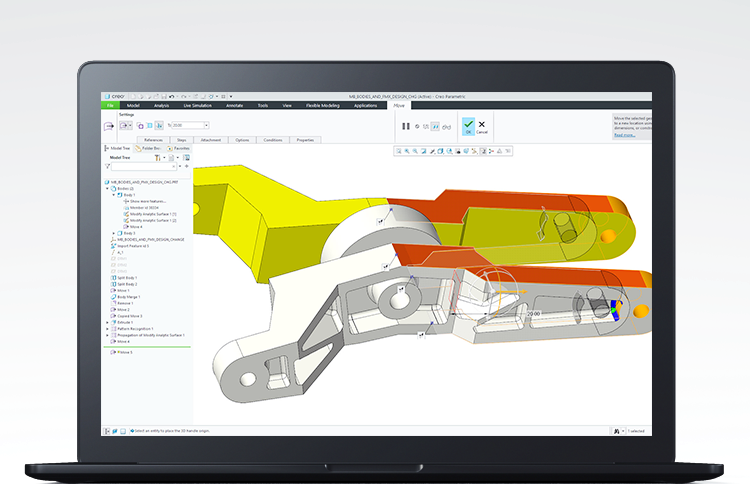
Engineering change is unavoidable. The inefficiency comes from how changes are requested, implemented, and released. A mature CAD workflow ties directly into PLM‑driven change processes.
Modern change workflow
- Change request
- Originates from field feedback, quality issues, or cost reduction ideas.
- Submitted into PLM with impact, urgency, and affected items.
- Impact analysis
- PLM identifies all affected CAD parts, assemblies, drawings, and downstream items.
- Engineers review model dependencies and assemblies for ripple effects.
- CAD modification
- Assigned engineer updates models based on:
- Standard design rules
- Templates and parameters
- Guidelines from the change request
- Review and approval
- PLM drives approvals (engineering, manufacturing, quality, supply chain).
- Viewables from CAD (3D, 2D) are attached to the change for visual review.
- Automated release
- Approved change updates the released BOM, associated CAD, and documentation.
- Notifications push to stakeholders automatically.
Why this matters for speed
- Fewer “mystery changes” that show up late in manufacturing.
- Less time spent hunting down what a change actually impacts.
- Auditable trail that supports regulatory and customer requirements.
4. Connect CAD to ERP for BOM and Manufacturing Readiness
Fast product development doesn’t end at design completion. Delays often appear at handoff via missing data, mismatched part numbers, and unclear revision states. Tight CAD–PLM–ERP integration creates a clean path from virtual to physical.
Engineering BOM (EBOM) in CAD/PLM
- Built from CAD assemblies, not re‑keyed into ERP
- Structured by function: subassemblies and modules that reflect the design
- Carries essential attributes:
- Material specs
- Weight, volume
- Compliance data (RoHS, REACH, etc.)
Transformation to Manufacturing BOM (MBOM) in ERP
With integration in place:
- EBOM from PLM is transferred or synchronized to ERP
- Manufacturing engineers:
- Reorder or regroup items for production
- Add non‑modeled items (adhesives, packaging, consumables)
- Define routing and work centers

Real World Example
Several of our clients take advantage of these PLM/PDM to ERP integrations. One such client uses multiple integrations to support their unique medical device business needs. This client uses Solidworks as their CAD tool, and Solidworks PDM as their product data management tool. Their workflows are very complex, which makes the need to integrate with their ERP (Oracle Fusion Cloud ERP) a requirement. It is necessary to support that complexity when it comes to suppliers and costing. This client has also chosen to integrate their Solidworks PDM environment with their Quality Management System, (MasterControl), using APIs to pass information. You can learn more about this PDM to QMS integration here.
Benefits
- Eliminate duplicate manual BOM entry and the errors that come with it (human errors account for a large percentage of rework and problems)
- Shorten lead time from design release to first build
- Improve cost accuracy earlier, since ERP has timely and correct BOM data (finance will like this)
5. Automate Routine Work: Drawing, Check, and Release Workflows
Mechanical engineers add value by solving design problems, not repeatedly filling out title blocks or hunting for missing tolerances. Identify repetitive CAD tasks and wrap them in standard workflows.
Drawing creation
- Use templates that:
- Pre‑populate title blocks, notes, and standard views
- Enforce standard scales and projection methods
- Automate steps where possible:
- Standard view sets for common part types (e.g., plates, shafts, housings)
- Auto‑ballooning linked to BOM tables
- Default surface finish and GD&T callouts for common features
Model quality checks
A simple checklist or automated check can prevent days of rework:
- Fully constrained sketches and clean references
- Material assigned to every part
- Mass properties checked and documented for critical components
- Naming follows company standards (no “Part1”, “Test_123”, etc.)
- Key clearances/slots/hole patterns verified against interface standards
- Read more of our best practices here
Release
A release is triggered from CAD/PLM when checklists pass:
- Approval routing by product line or project
- Automated generation of neutral formats (STEP, PDF, DXF, etc.)
- Notifications to purchasing and manufacturing that a new or updated part is ready
Payoff
- Less time in “CAD admin”
- Fewer design‑related shop floor issues
- Higher trust in released documentation
6. Integrate Simulation into Your CAD Workflow Early
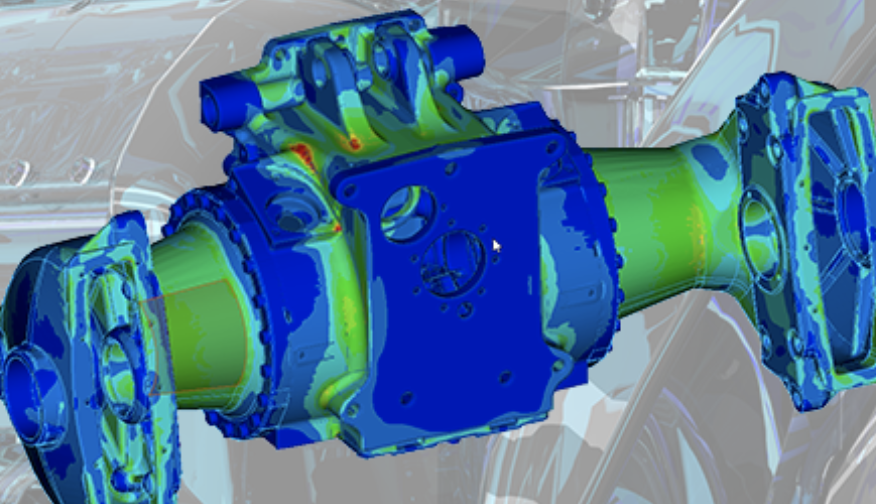
Waiting until late in the cycle to run FEA, CFD, or motion studies typically leads to major rework. Pull simulation closer to CAD (i.e. Creo Simulation) and treat it as part of the normal workflow.
Practical integration patterns
- Lightweight simulation in CAD during concept:
- Quick checks of stiffness, natural frequency, and basic stresses
- Screening of multiple concepts before committing to full detail
- Template studies for common components:
- Pressure vessel walls
- Brackets and supports
- Shafts, gears, and couplings
- PLM‑managed simulation data:
- Simulation setups stored alongside CAD and BOM
- Results traceable to specific revisions
Benefits
- Catch issues early and avoid late, expensive changes
- Reuse proven simulation setups across projects
- Build higher confidence in first‑article builds
7. Make Reuse a First-Class Workflow
Design reuse is one of the fastest paths to shorter lead times, but only if engineers can actually find and trust existing designs.
Components of a reuse workflow
- Classification and metadata
- Standardized attributes in CAD/PLM: function, material, range, rating, size.
- Manufacturer and part numbers are stored on each reusable part.
- Search and discovery
- Engineers search by:
- Function (“hinge”, “bracket”, “spacer”)
- Key parameters (range of lengths, diameters, load ratings)
- Visual search using geometry when supported.
- Controlled libraries
- Approved components and subassemblies:
- Fasteners, bearings, motors, sensors
- Standard brackets, frames, couplings
- Access controlled through PLM, not local “part libraries” on desktops.
Outcomes
- Design cycles focus on true innovation, not reinventing brackets
- Fewer unique parts to source, manage, and inventory
- Higher standardization, which reduces cost and simplifies quality control
Practical Tips to Get Started
If your current CAD process feels ad‑hoc, you don’t need a massive overhaul on day one. Start small and iterate.
- Pick one product line or project. Pilot your improved workflows on a scoped effort.
- Standardize templates and parameters. You can start with part templates, assembly templates, or drawing formats.
- Integrate CAD with PLM first. This will ensure models, revisions, and EBOMs are managed centrally.
- Then connect PLM to ERP. This allows you to automate BOM transfer and revision alignment.
- Ensure staff are trained (which SPK can help provide if needed). This ensures new engineers/team members are ramped up with the design intent/workflow knowledge to make them successful early on in their employment. Every organization has its own tools/workflows, so having training in place will make sure staff keep building on the processes in place to innovate more quickly.
- Finally, measure impact. You can track metrics like time from initial concept to released design, number of change orders driven by incomplete data, or reuse ratio vs. newly created parts. One of SPK’s clients uses an export from their Windchill PLM solution into their Power BI reporting engine to support near-real-time metrics of assemblies changed/checked-in/checked-out and more.
The Future of CAD Workflows
As digital transformation continues, CAD workflows are evolving toward greater connectivity and intelligence. Emerging trends include:
- Cloud-based CAD and PLM platforms
- AI-driven design optimization
- Real-time collaboration across global teams
- Enhanced digital twins and simulation capabilities
Tools like Creo and SolidWorks are increasingly integrating with broader ecosystems, making it easier than ever to connect design, data, and business processes.
Efficient CAD workflows are essential for accelerating product development while still remaining compliant. This can be a differentiator for staying competitive in today’s fast-paced market. By leveraging the capabilities of these modern CAD tools and ensuring modern workflows, organizations can eliminate manual handoffs and streamline their processes in order to innovate more efficiently.
Ultimately, the key to faster product development lies in creating a connected, automated, and collaborative environment where technology works in harmony. This lets engineers do what they do best: design great products. If you’re interested in how this can be done in your organization, contact our team today.