
Computer Aided Design has replaced manual design drafting, but with the rise of vCAD will traditional CAD systems also be replaced? Traditional CAD systems work well for designing accurate design representations, but they require extremely powerful (and expensive) hardware for engineers to create these designs, and perform simulations. This is one of the reasons we created SPK vCAD several years ago. Common issues that waste time for traditional CAD users can easily be resolved with vCAD. Let’s explore how SPK vCAD can increase productivity and efficiency.
What is SPK vCAD?
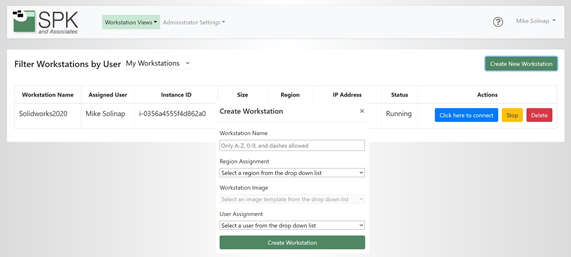
SPK’s vCAD tool is a virtual CAD system allowing engineers to design from anywhere. The cloud-based engineering platform allows users to quickly set up and manage virtual workstations in a SaaS platform. It works with common design applications like SolidWorks, Creo, Cadence, Ansys, and more. SPK vCAD resolves the issue of needing new equipment as it can be deployed from anywhere, reducing configuration and setup time.
Top Time-Wasters in CAD
Users of traditional CAD tools often encounter issues that waste time. Let’s explore the top time-wasters in CAD.
Non-Value-Added Data Management
15% of engineering time is typically wasted on tasks that do not directly contribute to the design and development process.
No Reusable Design Data
Design data reuse in traditional CAD systems can be challenging due to several factors ranging from technical limitations to workflow inefficiencies. Oftentimes, engineers must recreate designs from scratch.
Slow Search and Data Retrieval
CAD systems often experience slow search and data retrieval due to hardware performance.
Overwritten CAD Data
Sometimes CAD data gets overwritten due to human error or software limitations within the system, setting back projects due to data loss. 41% of manufacturers claim conflicting document versions have caused issues for them in the manufacturing process.
Design Preparation
Around 20% of non-value-added engineering time is spent collecting and preparing data for others when it could be spent producing work.
Unmanaged Complexity
3 out of 4 companies struggle to manage new technology. This lack of management can lead to inefficiencies, errors, and increased costs.
Ineffective Change Management
Poor change management can lead to accidentally sharing incorrect information with manufacturers, forcing them to rework their production cycles.
Difficulty Collaborating
Collaborating with team members in real-time is important but it can be difficult when everyone has their own setup. Issues working together lead to inefficient communication and workflow.
Updates and Maintenance
Constantly needing to update software can interrupt workflow.
How vCAD Saves Time
These common issues with traditional CAD solutions can easily be resolved with SPK vCAD. Here’s how:
Automation of Repetitive Tasks
Instead of having engineers work on tasks that add no value, vCAD can automate repetitive tasks, saving time and increasing efficiency.
Reuse Data
In addition to automating repetitive tasks, vCAD can reduce the need for manual redrawing by automatically creating new design iterations.
Intuitive User Interface
vCAD has a more intuitive and user-friendly interface, making it easier to navigate to quickly retrieve data.
Centralized Cloud-Based Storage
Storing files in the cloud prevents data loss due to corruption or accidental deletion, and makes files accessible from anywhere. Additionally, leveraging high-performance cloud computing resources allows vCAD to process large and complex CAD files more quickly than traditional local systems.
Automated Data Preparation
vCAD can streamline and potentially eliminate many aspects of design preparation in CAD workflows through automation. Instead of wasting time preparing files, vCAD automatically converts files between different formats, eliminating the need for manual conversion.
Complexity Management
vCAD’s automatic updates eliminate the need for managing new technologies. In addition to this, vCAD includes tools for automated design checks, ensuring compliance.
Version Control
New versions of files are automatically created by vCAD whenever changes are made which ensures that every modification is documented. Additionally, vCAD maintains detailed audit trails of all changes so manufacturers are always up to date.
Improved Collaboration Tools
vCAD enables real-time collaboration, allowing multiple users to work on the same project simultaneously.
Streamlined Updating and Maintenance
vCAD can automatically update to the latest version, ensuring all users have access to the newest features and improvements.
See how easy-to-use vCAD is in these videos.
Implementing SPK vCAD
In traditional Computer-Aided Design, several time-wasters such as software limitations and user errors can impact efficiency. This leads to wasted time, missed due dates, and ineffective workflows. Modern CAD systems such as vCAD are incorporating solutions to these issues. Cloud-based collaboration tools and AI-driven automation streamline the design process, resulting in increased productivity. By addressing key issues, SPK and Associates’ vCAD system significantly enhances the efficiency of CAD users, providing a modern solution to the limitations of traditional CAD systems. If you are interested in learning more or would like to implement vCAD for your business, contact our experts today.