
What Is The Self Service Catalog?
The CloudBees Continuous Delivery Self Service catalog is a powerful tool that allows non-technical people to run reports, and technical people to accelerate setup and configuration.
Why Should I Use Self Service Catalog?
The Self Service Catalog has an easy to use UI. You can run procedures, plugins, or custom scripts. Additionally, the Self Service Catalog also prevents users having unnecessary UI access (ex DevOps Essentials where procedures are). In parallel it still provides ability to execute reports when desired. CloudBees Continuous Delivery Self Service Catalog enables faster delivery and reduces dependencies on other people.
Self Service Catalog In Action
In this example we use a procedure to create a new project and clone over template pipelines to the new project within CloudBees CD. This is useful for onboarding a new team quickly and getting their deployment pipeline ready. The self service catalog gives the user a simple UI to use:
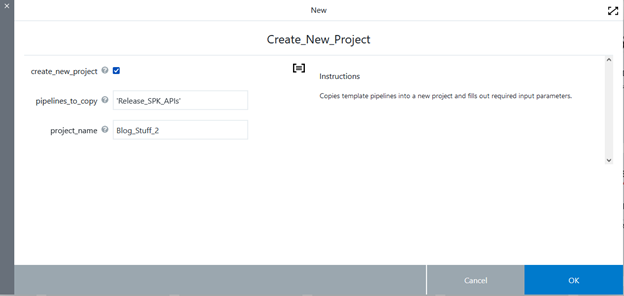
Now, select OK to run the procedure, showing the job status as it runs:
“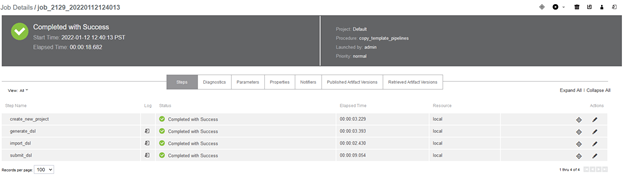
As demonstrated, the job is successful in creating the new project and copying over the pipeline to the new project. Now, when viewing pipelines we can see there is a copy of the pipeline from Project “Blog_Stuff” to “Blog_Stuff_2”

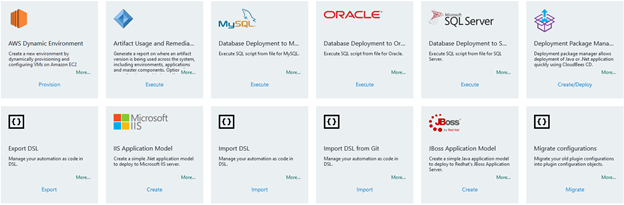
There are also a number of existing self service catalog items that you can use as for various tasks:
To create a new self service catalog, click on “Service Catalog” on the top and then click on the “create new” button in the upper right corner. Give it a name and then select the project you want it to reside in.
Once that’s done, it will ask you to define its steps:
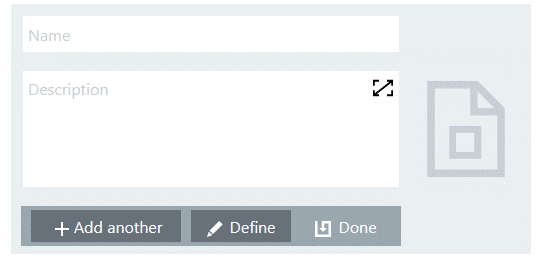
Now select “Define” and you will be taken to the screen to create the catalog item:
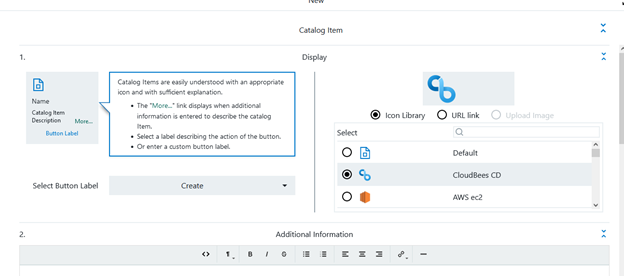
You are now able to give it a label, icon, and assign it to a procedure, plugin, or custom DSL.