
Key Takeaways
- Creo ISDX (Interactive Surface Design Extension) is a Creo Parametric add-on for building freeform curves and surfaces, aimed at shapes like ergonomic grips and sculpted housings that are slow to model with technical surfacing alone.
- Engineers edit curves and surfaces directly in a four-view workspace (plan, side, front, isometric), set continuity from G0 position through G3 acceleration, and generate boundary, loft, blend, or N-sided surfaces from selected curves.
- Designers can trace over imported 2D sketches or photos, build on facet models and scan data, and convert imported datum curves into editable ISDX curves for reverse engineering.
- Zebra plots and curvature feedback update in real time, and because ISDX lives inside Creo Parametric, changing a driving dimension (such as a handle angle) updates the dependent freeform surfaces without a rebuild.
Creo Interactive Surface Design Extension (ISDX), is an add-on for Creo Parametric that enables engineers to create and edit freeform curves and surfaces, all without leaving the parametric environment they count on. This results in faster, higher-quality surfacing for the stylized, organic geometry that makes products stand out. This is important because aesthetics sell products. Consumer electronics, medical devices, power tools, and automotive components are all judged as much on how they look and feel as how they work. While traditional technical surfacing makes freeform shapes slow and frustrating to build, Creo ISDX fills that void by giving you the freedom of freeform design with the control and associativity of parametric modeling.
What Is Creo ISDX?
Creo ISDX is a freeform curve and surface creation add-on that runs inside Creo Parametric. It’s built for geometry that is difficult to define with constraints and parameters such as flowing product casings, ergonomic grips, and sculpted housings. Constructing those shapes using only technical surfacing is tedious. Engineers spend hours defining high-quality curves and surfaces, and they can have a hard time capturing styling requirements. This leads them to evaluate fewer design options, as each one takes so long. Creo ISDX changes the game. Instead of controlling shape through constraints and parameters, engineers create and edit the curves and surfaces directly. They can define how those surfaces connect, draw directly on top of concept images or imported data, and see the results in real time.
Key Features and Benefits for CAD Designers
An environment built for freeform design
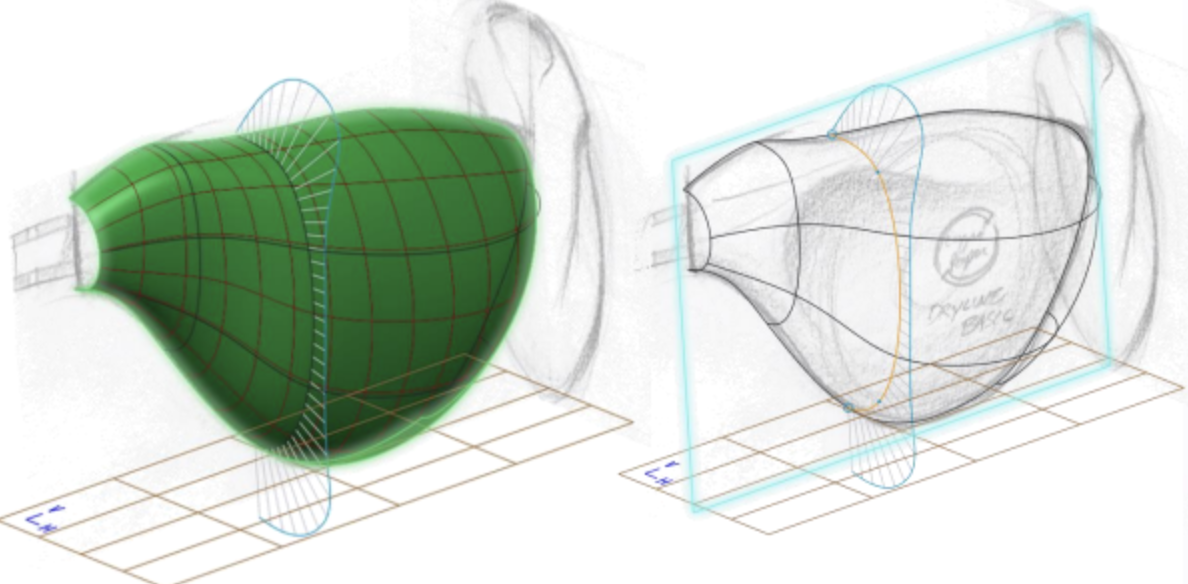
Creo ISDX provides designers a focused workspace and intuitive interface with four view window displays: plan, side, front, and isometric. When you build curves in 3D, you work in several planes at the same time. Seeing all views together allows designers to control the X, Y, and Z positions and be aware of the effect of a change from all perspectives. ISDX tool keys improve selection speed and editing control, while design and analysis functions are dynamically updated as geometry changes. Most importantly, freeform and technical surfacing are integrated in one environment, so designers have maximum flexibility without changing tools.
Fast, flexible curve creation and editing
All good surfaces are based on curves, and ISDX makes it easy to create and edit them. Designers can quickly generate planar and 3D curves with options such as curve on surface, curve from surface, project on surface, and isoline curves. They can copy, rotate, move, and scale curves. Additionally, designers can change the type between free, planar, and curve on surface. They can edit individual control points, add new points as needed, and use dynamic porcupine curves that give instant feedback on the curvature. Connections between curves are as easy to set, with toggles for position (G0), tangent (G1), curvature (G2), and acceleration (G3) continuity.
Smart surface creation and editing
Once the curves are in position, the surfaces follow quickly. Designers select specific curves, and ISDX automatically creates boundary, loft, or blend surfaces. Users can mirror surfaces, refine them with internal and U/V reparameterization curves, and change the surface type as your design evolves. Additionally, ISDX provides N-sided surface creation for complex areas with 5 or more boundaries. Designers can also control surface connections in every possible way. They can set continuity and leader-follower relationships, then reshape a surface by editing its defining curves or control points directly.
Capture design intent from images and imported data
Many great products start with a sketch, photo, or scan. Designers can import 2D images into ISDX and trace over them to get the design intent of the original concept in 3D. In addition to this, they can work directly from facet models, imported geometry, and sample data, building ISDX curves over existing information. The Curve from Datum option converts imported datum curves to editable ISDX curves, greatly simplifying reverse engineering and reuse of legacy data.
Built-in surface quality analysis
Surface quality is important for manufacturability and appearance. Using tools such as zebra plots that simulate the way light reflects off a surface, designers can quickly verify that surfaces are smooth, have continuous curvature, and are free of flaws. The analysis updates in real time as edits are made, so quality checks are part of the design process, not a separate step at the end.
Full parametric associativity
This is where ISDX differs from stand-alone styling tools. Since it is integrated into Creo Parametric, freeform geometry remains connected to the rest of the model. If an engineer modifies a critical dimension, such as the angle of a product’s head or handle, the curves and surfaces related to that dimension update automatically. Late design changes no longer require reconstructing complex surfaces.
What Creo ISDX Delivers
- Faster time to market: Designers can build complex freeform, organic, and stylized geometry in a fraction of the time it takes to create technical surfaces. Teams are testing more concepts earlier and reaching a final design faster.
- Reduced development costs: Combining parametric modeling with freeform flexibility cuts design time. Associative updates avoid expensive rework if requirements change late in development.
- Products that excel: In crowded markets, high-quality products with aesthetically appealing designs stand out and cater to growing consumer demand for styling.
- Room for a premium price: Products that look good command higher value. ISDX lets teams capture styling and customer appeal, while still accurately defining the complex surfaces that engineering and manufacturing require.
Get More from Creo ISDX with SPK and PTC
Creo ISDX gives engineers the liberty to design the forms customers want, without compromising the precision and associativity engineering requires. It transforms complex surfacing from a bottleneck into a competitive advantage. A Creo license alone won’t get you the most out of it, though. As a PTC partner, SPK and Associates helps engineering teams choose the right Creo packages and extensions. We deploy and set them up for your team, and provide expert advice on how to use ISDX effectively. Furthermore, we can connect Creo to the rest of your engineering toolchain so your freeform designs flow seamlessly into PLM, manufacturing, and quality processes. If you want to see how Creo ISDX can help your designs, contact SPK and Associates.