

Manual administrative tasks are the common enemy across industries. They drain productivity across teams, and in complex business environments, repetitive work can quickly become overwhelming. This is especially true for teams with large volumes of projects, service requests, approvals, or compliance tracking. When teams rely on manual processes to replicate issues, update fields, or recreate workflows, they introduce unnecessary human error. These inconsistencies can lead to reporting gaps, missed details, duplicated effort, and delays in execution.

The goal of any modern organization is to ensure technology works efficiently for people. This means removing mundane hurdles so users can focus on high-value work instead of repetitive administration. One of the most common hurdles in the Atlassian ecosystem is the limitation of native Jira cloning. While Jira is a powerful platform for work management, its out-of-the-box cloning capabilities often fail to meet the needs of large-scale, fast-moving organizations. This is where Clone Plus for Jira becomes a strategic asset for teams looking to improve operational efficiency and workflow consistency.
The Friction of Repetition in Jira Workflows
Repetitive tasks are more than just a nuisance for individual contributors. For Jira administrators, project managers, and team leads, these tasks represent a systemic bottleneck. Consider the process of launching a new project, onboarding a new department, or replicating a successful workflow structure across teams. This may involve creating dozens or even hundreds of related issues, subtasks, and dependencies. If users must manually clone and update each issue, the process becomes a significant drain on resources.
Native Jira cloning is often too rigid for sophisticated workflows. It typically requires a one-to-one replication that does not allow for bulk modifications or cross-project transitions during the cloning process. This lack of flexibility forces users to perform double work by cloning an issue and then immediately editing it to correct field values, update ownership, or move it into the proper project. When this happens repeatedly across a large organization, the productivity loss becomes substantial. Furthermore, manual updates are often inconsistent, creating fragmented data that complicates reporting, governance, and visibility across teams.
Clone Plus: Building Predictable Jira Processes
Clone Plus for Jira addresses these challenges by turning manual cloning into a fast, easy, and predictable process. It is designed for organizations that have outgrown basic task management and require a more scalable way to manage Jira operations. The application provides an intuitive interface that allows teams to customize cloning behavior without requiring major technical changes to Jira itself.
By implementing Clone Plus, Jira users can move away from a copy-and-paste mentality and adopt a more standardized approach to issue management. This reduces the time and effort involved in repetitive administrative work while minimizing the risk of errors. For organizations managing large workflows, projects, or regulated processes, this predictability helps ensure that issues are created consistently with the correct metadata, workflows, and relationships already in place.
Scaling Operations with Bulk Cloning
One of the most significant differentiators of Clone Plus is its ability to handle bulk operations at scale. In large organizations, the need to replicate entire backlogs, project templates, or issue sets is common. Native Jira functionality often limits users to cloning issues individually, which becomes impractical when dealing with large datasets. Clone Plus allows users to bulk clone up to 1,000 issues in a single operation.
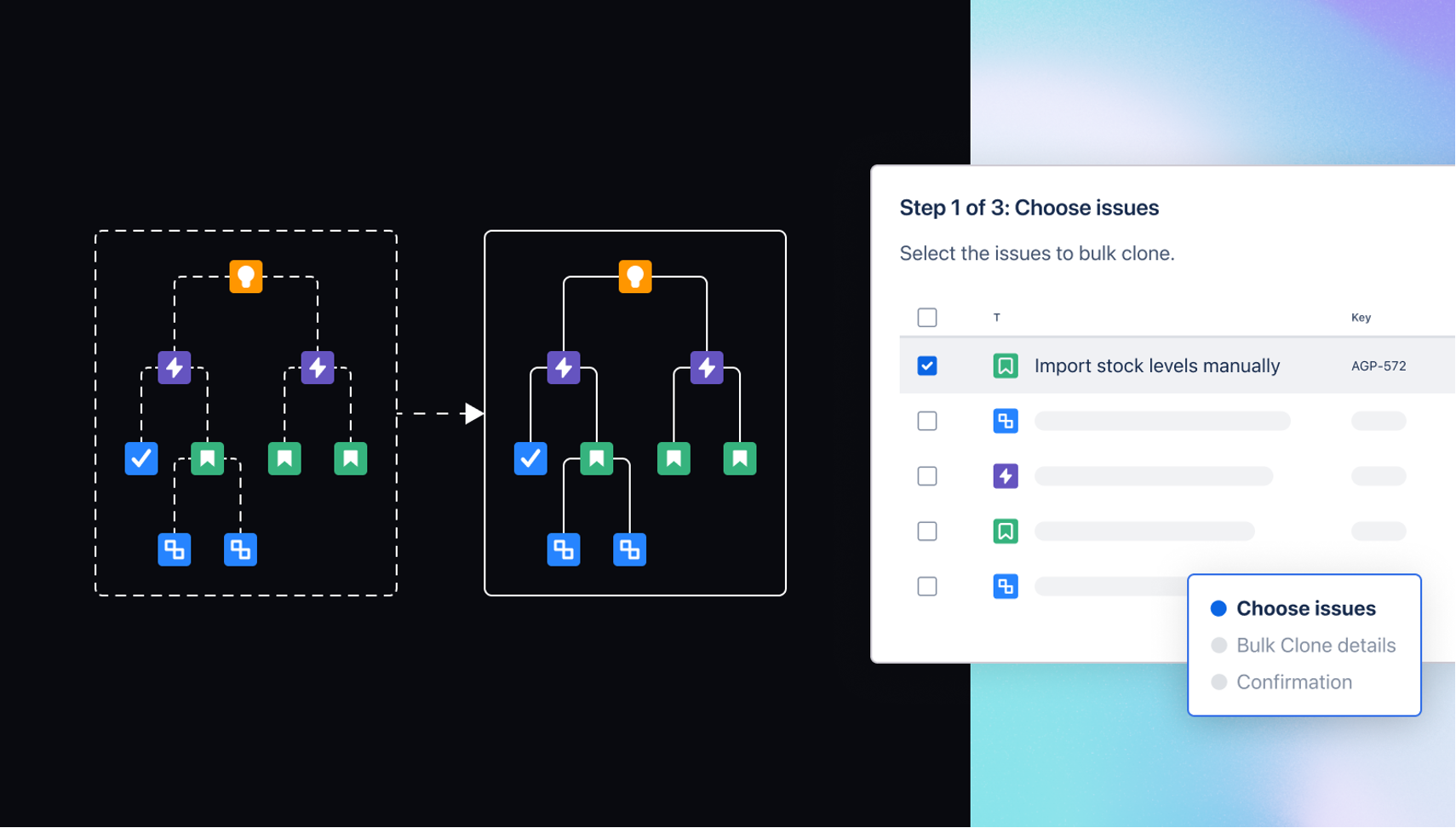
This capability is especially valuable for teams managing recurring projects, standard onboarding processes, campaign launches, audit activities, or cross-functional initiatives. Users can select the relevant issues, define the target project, and execute the operation in seconds. The tool also allows field values to be updated across the entire batch before cloning is finalized. This ensures that new issues are accurate and aligned from the start, eliminating the need for post-clone cleanup.
Improving Consistency with Template-Driven Cloning
Consistency is critical for maintaining clean and reliable Jira environments. When workflows are inconsistent, reporting and collaboration suffer. Clone Plus enables administrators to define specialized cloning templates that enforce organizational standards. These templates can be configured to include or exclude custom fields, copy watchers, preserve issue relationships, or maintain links between epics, tasks, and subtasks.
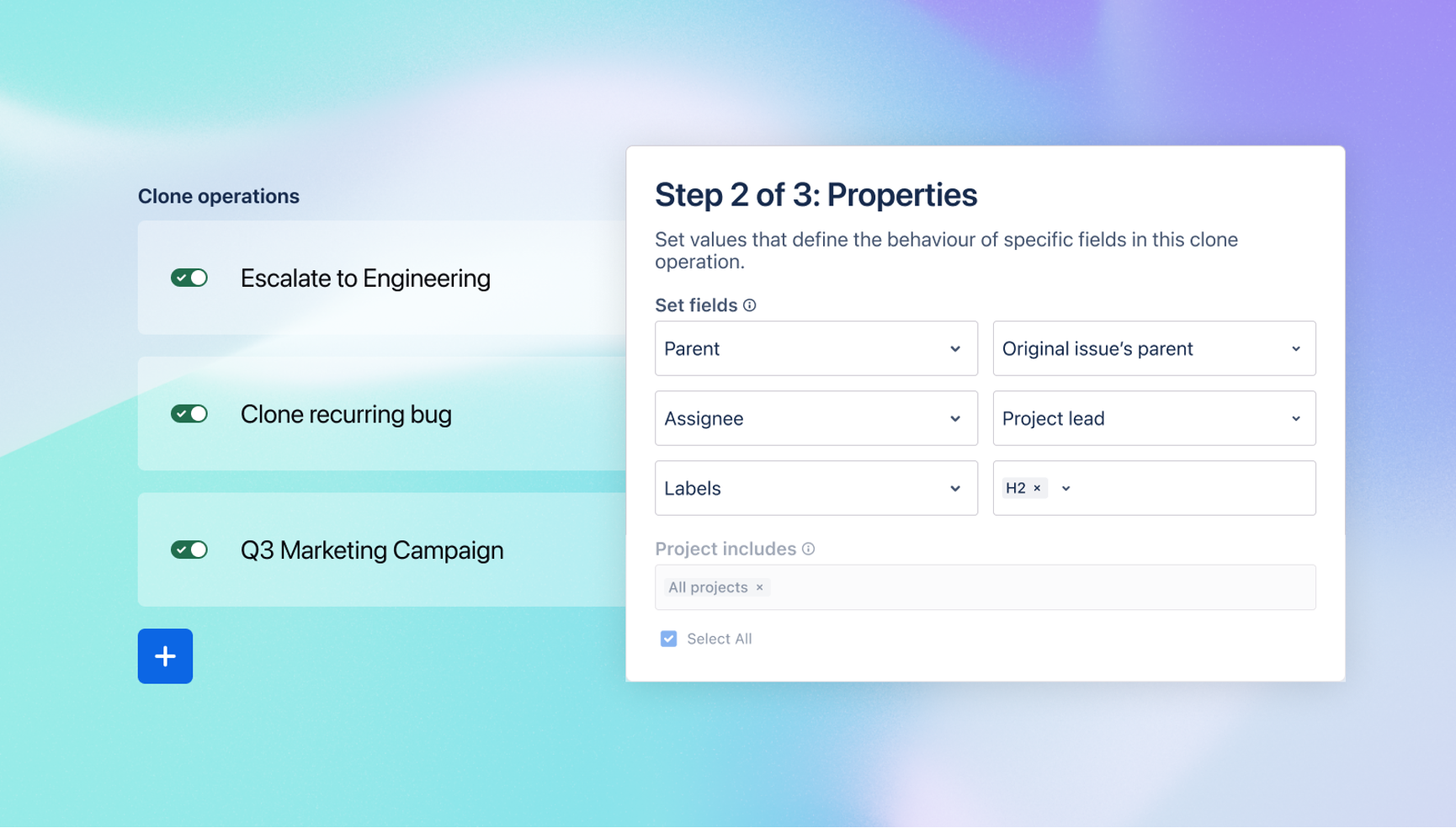
Templates remove guesswork for end users. Instead of deciding which fields to copy or modify, users simply select the appropriate template for their scenario. This helps organizations standardize processes across departments and ensures that every cloned issue follows the same structure and governance model. The result is cleaner data, improved visibility, and reduced administrative overhead.
Cross-Project Flexibility for Connected Teams
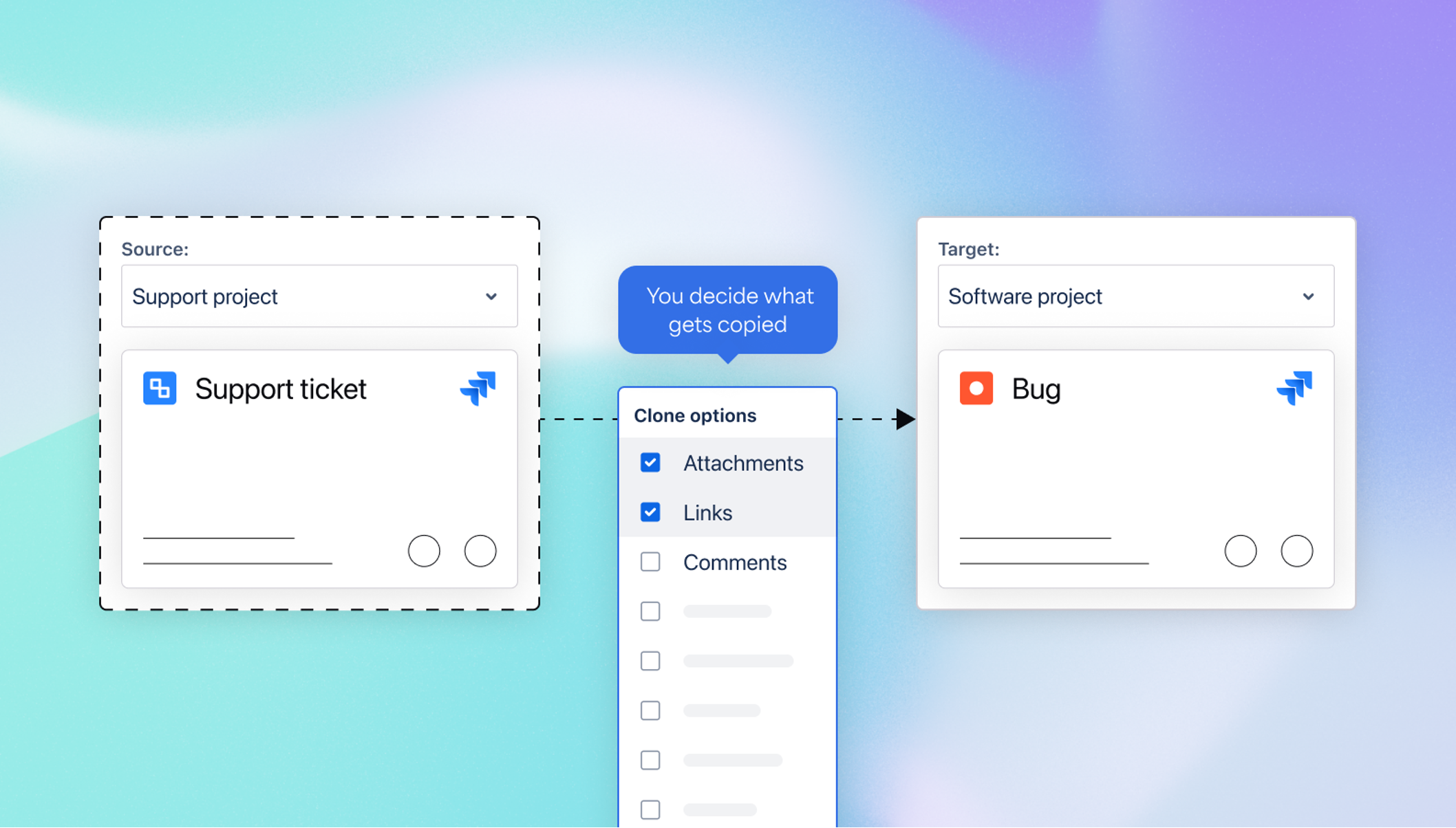
IT, HR, operations, customer support, product teams, and business stakeholders often work across multiple Jira projects with different configurations and workflows. Native Jira cloning makes it difficult to transition issues between these spaces during the cloning process. Clone Plus removes this barrier by allowing users to change the target project and issue type dynamically.
This flexibility supports more connected workflows across the organization. For example, a support ticket can be cloned directly into another project as a bug, task, service request, or escalation issue while automatically updating the necessary fields. Teams can also remove unnecessary information, add attachments, or apply standardized templates during the transition. This streamlined movement of work across Jira environments reduces friction and improves collaboration between teams.
Strategic Use Cases for Jira Teams
The practical applications of Clone Plus extend across nearly every Jira use case. One of the most immediate benefits is onboarding new Jira users or teams. Administrators can create onboarding templates that automatically generate standard setup tasks, assign ownership, and apply deadlines in a single action.
Another valuable use case is replicating complex project structures. Many organizations rely on standardized epics, tasks, and subtasks for recurring initiatives. Clone Plus simplifies the cloning of entire hierarchies while preserving relationships between issues. This allows teams to quickly recreate proven project structures without rebuilding workflows from scratch.
The tool is also highly effective for service management and escalation workflows. Support teams can use custom clone templates to ensure escalated requests contain the exact information required by the next team involved. This reduces unnecessary back-and-forth communication and accelerates resolution times.
Creating a Scalable and Efficient Jira Environment
As organizations grow, Jira environments naturally become more complex. Without the right tools, this complexity can lead to inconsistent data, manual workarounds, and operational inefficiencies. Clone Plus for Jira provides the customization and scalability needed to maintain a healthy Jira instance that supports efficient collaboration across teams.
At SPK and Associates, we understand that Jira should simplify work, not create additional administrative burden. We help organizations optimize and modernize their Atlassian environments to improve efficiency, consistency, and scalability. By leveraging tools like Clone Plus, organizations can reduce repetitive work, standardize workflows, and empower Jira users to focus on higher-value activities. If your team is struggling with repetitive tasks or inconsistent Jira workflows, contact our team to explore how a standardized cloning process can improve efficiency and collaboration across your organization.