
Visibility is the difference between a project that stays on track and one that succumbs to death by a thousand cuts. It can be easy to become caught between the granular, execution-focused data living in Jira and the high-level, strategic business intelligence managed in Power BI. When these two worlds remain siloed, decision-making suffers. Business leaders are forced to rely on manual data exports, static PDF screenshots, or tedious spreadsheet reconciliations. At SPK and Associates, we believe technology should reduce friction, not create administrative work. That is why we recommend using a single source of truth when reporting. By unifying Jira data with Power BI, organizations can achieve proactive, data-driven management.
Connecting Jira and Power BI with Appfire
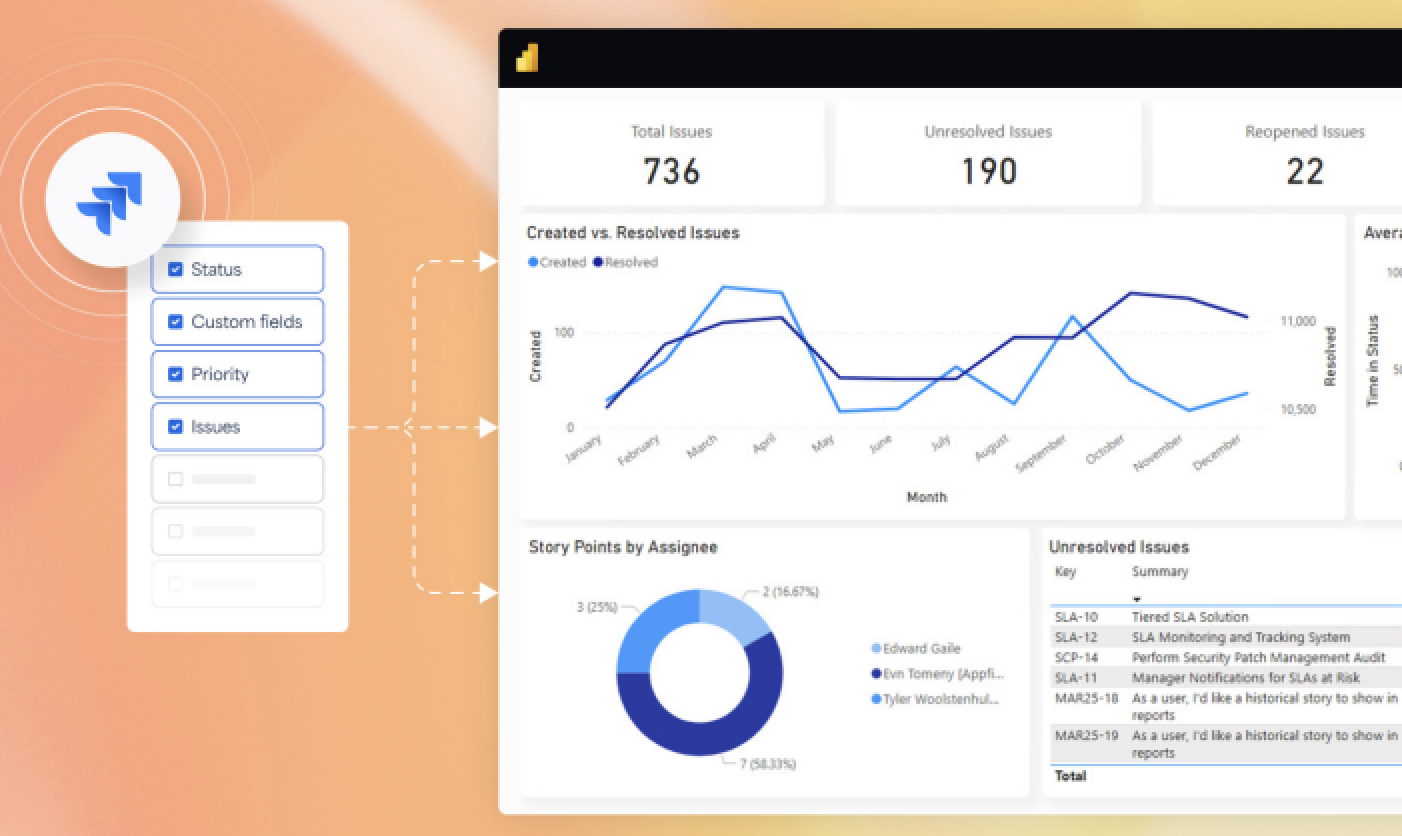
The best way to connect your Jira and Power BI data is by using the Power BI Connector by Appfire. This add-on (available on the Atlassian Marketplace) is an enterprise-grade integration tool designed to bridge the gap between Atlassian’s Jira and Microsoft’s Power BI. It allows organizations to seamlessly and securely export Jira data into Power BI to create custom dashboards, advanced charts, and comprehensive business reports. Additionally, it handles the complexity of modern Jira environments, including Jira Software, Jira Service Management, and a vast array of custom fields, ensuring that the data arriving in your BI tool is accurate, contextual, and ready for analysis.




Key Features of the Power BI Connector by Appfire
The strength of the Appfire Power BI Connector lies in its simplicity and depth. It is designed to be set and forget for admins while providing immense flexibility for data analysts.

1. Unified Connector URL and JQL Integration
One of the most powerful features is the ability to use a single connector URL to create any number of data sets. By leveraging Jira Query Language, users can filter exactly what data they want to pull, whether it is a specific project, a component, or a cross-project initiative, without having to manage multiple complex connections.
2. Comprehensive Field Support
The connector does not just pull basic issue titles. It provides access to:
- Agile Metrics: Sprint data, story points, and velocity.
- JSM Metrics: SLA tracking, time-to-resolution, and escalation history.
- Work Logs: Time reporting and resource utilization.
- History and Custom Fields: Tracking how data has changed over time and pulling in industry-specific custom fields.
3. Scheduled Data Syncs
Real-time reporting requires up-to-date data. The connector enables scheduled syncs, ensuring that your Power BI dashboards reflect the current state of your Jira instance without manual intervention.
4. Enterprise-Grade Security and Compliance
For clients in regulated industries like medical devices or aerospace, security is non-negotiable. The Appfire connector is SOC2 and ISO 27001 certified. It also offers configurable security permissions, allowing admins to control exactly who can access sensitive engineering data.

Benefits of Using the Power BI Connector for Jira
The Appfire Power BI Connector is a simple way to provide several immediate business benefits.
A Single Source of Truth
First, by bringing Jira data into Power BI, you can merge it with other critical business data sources like Excel, SQL databases, or ERP systems such as SAP. This allows executives to see engineering progress alongside financial performance or supply chain constraints, providing a truly global view of the business.
Visibility Without Jira Access
Not every stakeholder needs or wants to navigate the complexities of a Jira backlog. This tool allows you to deliver high-level insights and dashboards to management and C-level executives directly inside Power BI, regardless of whether they have a Jira license.
Improved Sprint and Capacity Planning
Engineering directors can visualize sprint progress and capacity at a glance. By spotting resource constraints early and assessing KPIs like estimated vs. actual time, leaders can make informed adjustments to workloads before they lead to burnout or missed deadlines.
Enhanced ITSM Process Analysis
For teams using Jira Service Management, the connector allows for deep analysis of ticket requests and performance categories. You can create sophisticated time-to-resolution reports that help identify bottlenecks in your support or internal service processes.
Ready to Integrate Jira and Power BI?
At SPK and Associates, we understand that a tool is only as good as the strategy behind it. As a proud Appfire partner, we specialize in helping engineering organizations optimize their Atlassian ecosystem and business intelligence workflows. Whether you are looking to consolidate 30+ projects into a single dashboard or need to bridge the gap between on-premise and cloud Jira instances, our team has the expertise to get you there.
Stop spending hours on manual data imports and start driving better decisions with a unified reporting strategy. Contact SPK and Associates today to see how we can help you set up the Power BI Connector and transform your engineering insights.