
When dealing with IT issues, there are a few standard support levels. L0, while not always recognized, is our self-service level, in which a user fixes the issue alone. L1 handles the inbound noise, password resets, and easy-to-fix tickets. Then L2 picks up what L1 can’t close: deeper configuration issues, account-specific bugs, anything that needs more than a runbook. Finally, L3 requires engineering or specialized ops, the people who fix the underlying problem.
The issue here is that each tier frequently lives in a different tool. L1 sits in Zendesk or Intercom, L2 lives in Jira or Jira Service Management, and L3 lives in ServiceNow, Azure DevOps, or a separate Jira instance entirely.
The split works until a ticket has to cross tiers. Then the cracks show.



Where Ticket Escalations Actually Break
The failure modes are predictable for most organizations as far as ticket escalations are concerned. The L1 agent loses visibility the second the ticket leaves their queue. The L2 engineer asks a clarifying question that never makes it back to the customer because it’s sitting in a Jira comment no one in Zendesk can see.
The customer follows up, L1 has no update, and the ticket gets reopened in a third tool. Now there are three versions of the same issue floating around, and the customer is the one who notices.
This also leads us to the issue of duplicate tickets. When a vendor or internal team replies to an existing thread in their tool, some integrations spawn a fresh ticket on the other side instead of updating the original.
Then there’s the clutter problem, which runs in the opposite direction.
One client syncing Jira and ServiceNow found that internal comments meant for the engineering team were bleeding across into the customer-facing side, creating confusion about what was an actual customer update versus an internal note.
Additionally, the failures compound at the worst possible moment. A ticket that escalates is, by definition, the one L1 couldn’t solve. It’s already the harder problem, the more frustrated customer, the tighter SLA clock. That’s exactly when a broken handoff hurts most.
Real-world Use Cases that Feature this Escalation Problem
MSP running Zendesk for L1 into a customer’s ServiceNow
Let’s explore an example of this disjointed workflow. A managed service provider takes calls and documents tickets in their own Zendesk instance. When something needs the customer’s engineering team, the L2 and L3 work happens in the customer’s ServiceNow.
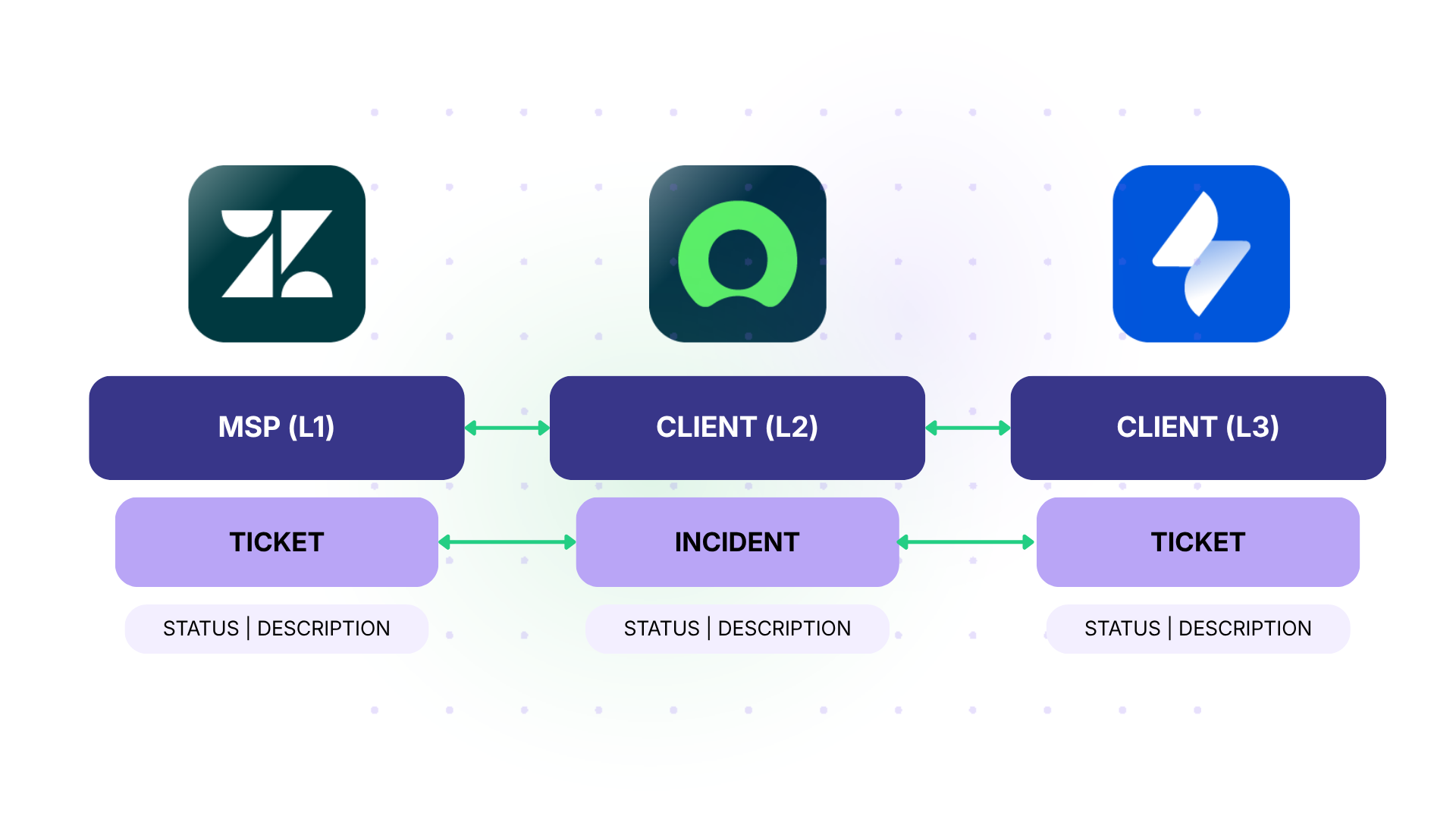
The catch here is that the MSP supports multiple customers from one Zendesk, and each customer’s data is isolated from the others for data protection. One customer must never see or sync with another customer’s tickets.
The resolved state is a selective sync keyed to the specific customer. A ticket tagged “Customer A” in Zendesk syncs only into Customer A’s ServiceNow instance, and that tag maps to a field on the ServiceNow side (say, an account or company field), so the receiving team can see and filter by which client it belongs to.
Comments flow both ways, so the MSP’s L1 agent can update the caller without logging into ServiceNow, and the “Customer B” tag routes somewhere else entirely, which means zero cross-contamination between client accounts.
Freshdesk for L1, Jira for L2
The L1 team fields service requests from the IT helpdesk in Freshdesk. When something needs deeper IT work, it escalates to an L2 team working in Jira.
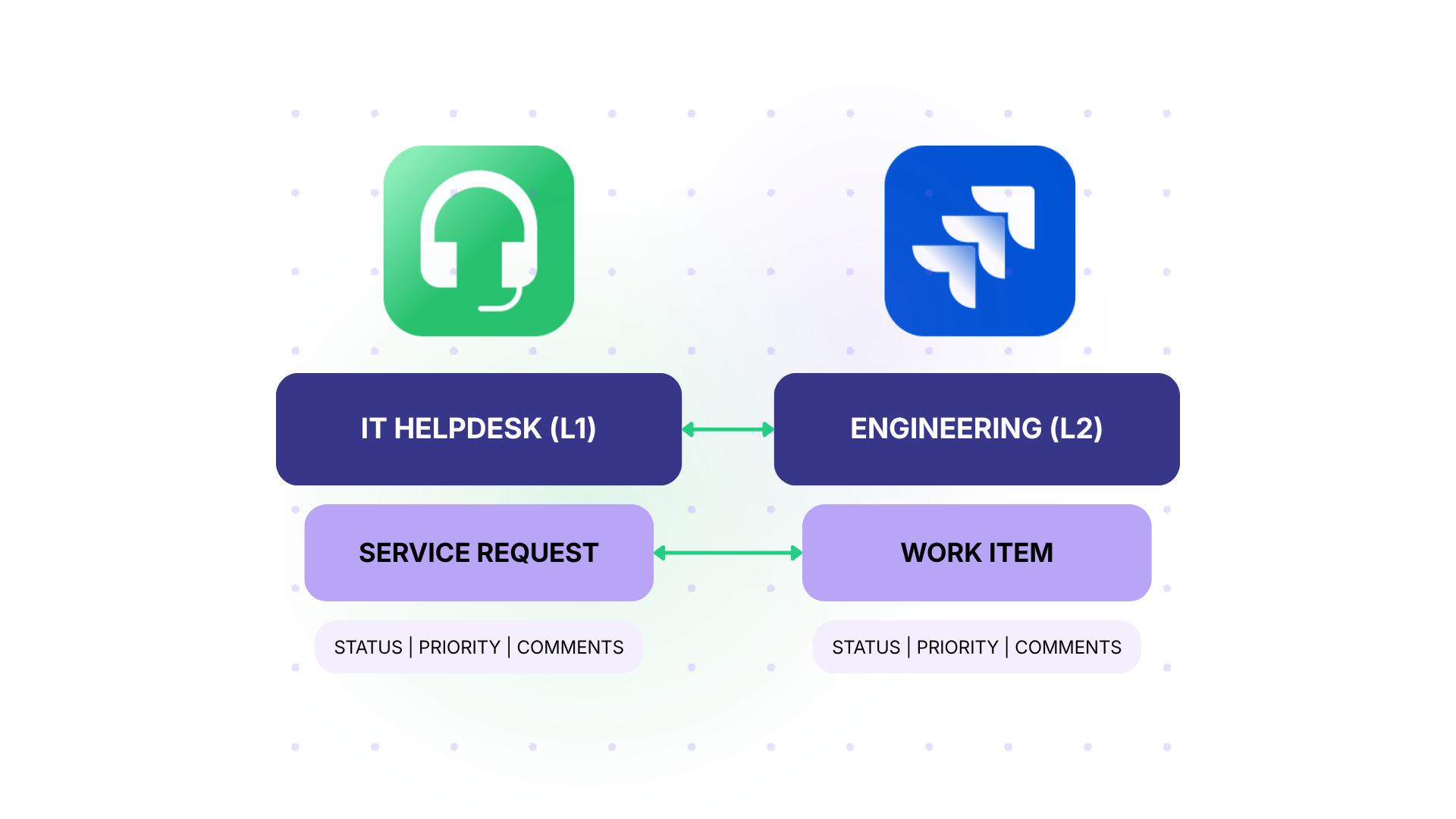
The requirement is specific: when L1 escalates, the Freshdesk ticket converts into a Jira work item, then both systems sync in real time. When the customer responds by email and updates Freshdesk, that flows to Jira. When the L2 tech changes status or adds detail in Jira, that flows back to Freshdesk.
MSP Receiving Escalations From Many Client Instances
Here is a second example. An MSP runs a central Freshservice instance and supports 20 separate client instances. When a service desk member on any client instance escalates a ticket, it should create and sync into the central Freshservice instance.
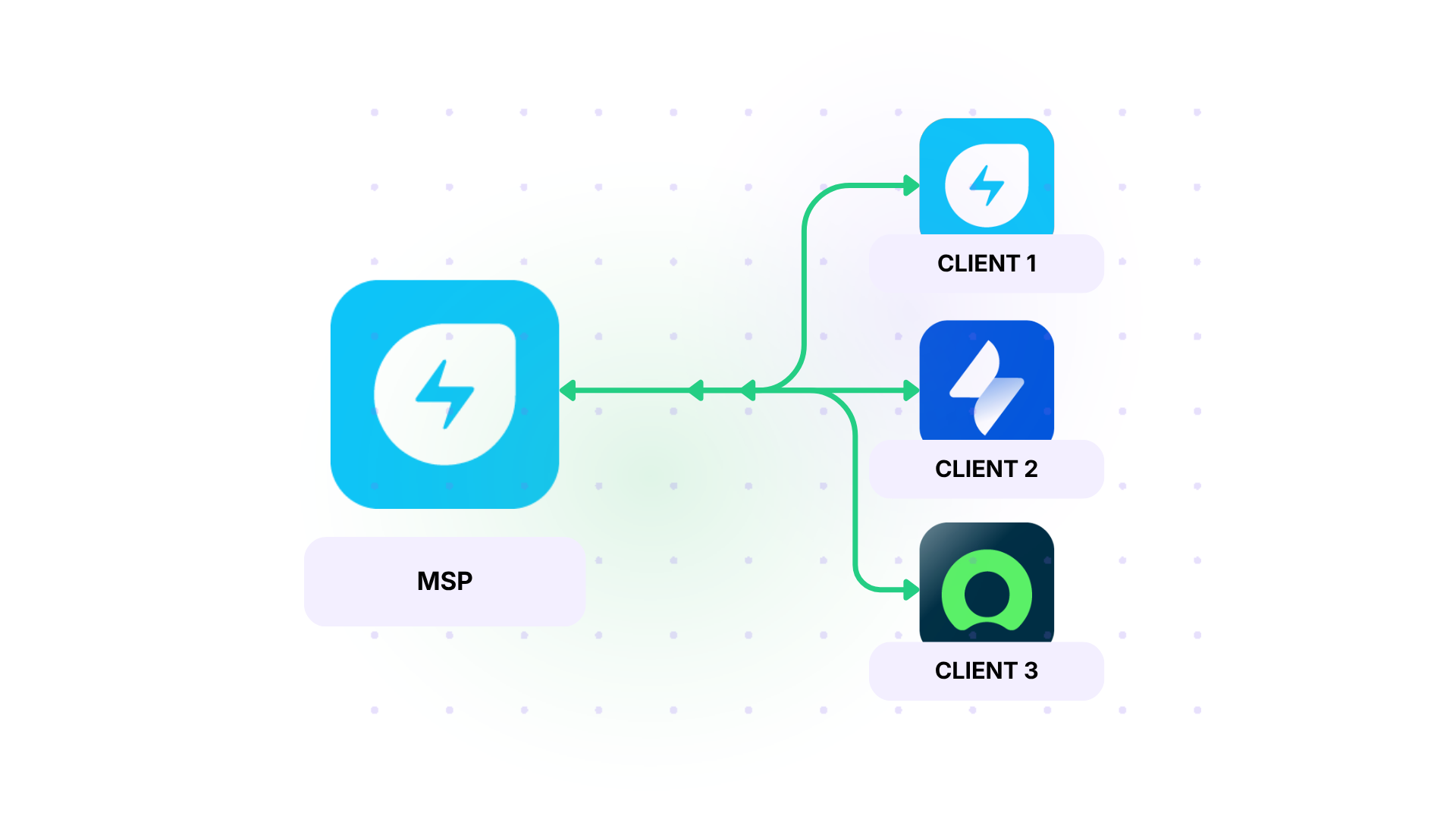
However, it is important that only one client’s instance communicates with the central Freshservice instance at any given time. The other 19 client instances must stay independent from each other.
This is a hub-and-spoke escalation model, and it only works if each spoke is configured independently without leaking into the others.
Enterprise Customer Service Routing to a Separate Tech Function
Example three: A 40-person customer service team works in Zendesk and needs to hand escalations to the technology function, which works in ServiceNow. Right now, they bridge the gap with Zendesk’s side conversation feature and email, which means agents are switching tools and losing the thread.
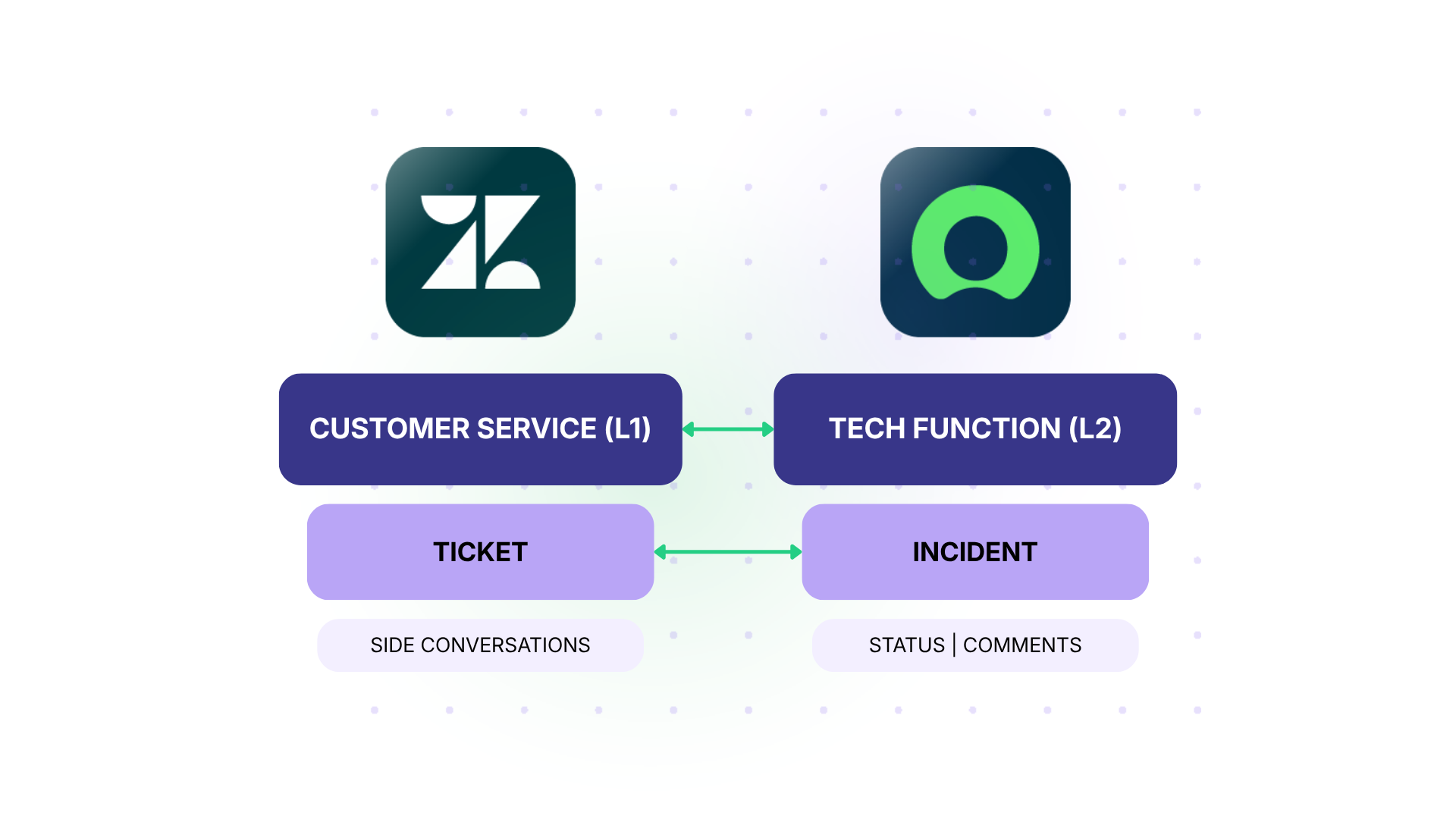
What they want is one ticket, visible from both sides, updating in real time, so the customer service agent never has to leave Zendesk to know where engineering stands.
Why the Obvious Solutions Don’t Always Work
Most teams try the same three things before landing on a real integration solution.
Native Point-to-Point Connectors
Most native connectors break on anything beyond basic syncs: field mapping that isn’t 1:1, conditional sync rules, PII filtering, and multiple instances on one side.
Zendesk has a native Jira app. ServiceNow has its own Jira Spoke inside IntegrationHub. Atlassian offers a native Jira Service Management to ServiceNow connector through the ServiceNow Store.
IntegrationHub is ServiceNow-centric by design, so the ServiceNow side holds the control, and the Jira side adapts to it.
A common breaking point occurs when a ServiceNow tenant needs to communicate with more than one Jira instance, or vice versa. Out of the box, Jira typically only allows one connection of that type. So the second L2 team is stuck.
We’ve seen this play out during mergers, where two companies each bring their own ServiceNow and Jira instances, and the consolidation roadmap leads to delays.

Custom API Integrations
Another common solution is custom API integrations. Engineering builds a custom webhook that addresses all the use cases they have on launch day. A few months later, the engineering manager changes a field name in Jira, ServiceNow ships a UI update, or a new ticket type appears, and the integration stops working as expected.
This is also an issue for clients who inherit a sync setup from a previous employee, don’t know what was configured or what’s broken, and only find out something’s wrong when a customer escalates a missing update.
To add to that, custom integrations often come with additional maintenance debt.
Template-Based Integration Tools
Then there’s the middle option: tools that promise no-code sync through prebuilt templates. They’re easy to set up, but once the use case gets more complex, you’re stuck with only default configurations.
The clearest example is comment handling. One team tried a template-based tool and dropped it because it couldn’t separate internal notes from public replies. Everything synced or nothing did, with no way to keep L2’s investigation notes out of the customer-facing view.

What a Proper Integration Solution Does Differently
A real integration layer gives each side control over what comes in and what goes out, on its own terms. For a tool like Exalate, this involves some of the following:

Independent Configuration on Each Side
Each team configures its own end of the integration without touching the other side’s setup. L1 in Zendesk decides which fields to send and which internal notes to filter. L2 in Jira decides which fields to accept, how to map ticket types, and what triggers an escalation back the other way.
This matters most in cross-company escalations, like an MSP routing into a customer’s ServiceNow, where neither side will grant the other admin access. It matters internally, too, because the L1 team instance needs to evolve on a different timeline than the L2. When L2 adds a new field or workflow, you don’t want it to break the L1 sync.
Field-level Filtering and Mapping
A healthcare team can keep social security numbers and patient details in Zendesk while still escalating the technical problem to Jira. Internal notes can stay invisible to customers. ServiceNow severity can map to Jira priority through a translation rule, not a forced 1:1 match.
For MSPs supporting multiple customers in one Zendesk and routing into different ServiceNow tenants, you need to guarantee that customer A’s tickets never appear on customer B’s side.
Bidirectional Updates without Flooding the Source
When L2 updates the Jira ticket, the L1 agent sees the status change in Zendesk. When the customer replies in Zendesk, the L2 engineer sees the comment in Jira. However, a clarifying question from L3 doesn’t auto-create a new L1 ticket and flood the queue.
We’ve seen this failure mode in production environments where every vendor’s reply to a DevOps issue spawned a fresh Jira ticket. The support team was drowning in duplicates and lost the thread on the original problem.
Exalate treats reply updates as updates, not as new records.
Selective Sync (by ticket type, label, or rule)
You want the sync to fire only when the ticket hits a specific group, gets a specific label, or reaches a specific status. The L3 group in Zendesk routes to engineering. Anything below that stays in L1. This is the lever that keeps your engineering teams from getting buried in noise the moment you turn on integration.
Scriptable Logic for the Hard Cases
For all complex use cases, you need a scripting engine that lives inside the integration. This gives you access to conditional escalation routing based on ticket type, custom field transformations, and multi-instance connections where one L1 ticket needs to land in two different L2 backlogs.
This is where Exalate fits well with clients. The independent configuration model maps cleanly onto how tiered support actually operates, where each team owns its own tooling and shouldn’t have to negotiate field schemas across the line.
The Groovy scripting engine covers the cases that don’t fit a visual configurator, and the Aida assistant helps engineers translate plain-language requirements into sync rules.
The Exalate Features That Make This Safe to Run
A few features in Exalate are built specifically for escalation scenarios.
- Test Run lets you validate a configuration against real items without touching production.
- Script versioning keeps a traceable history of every change to your sync rules. Every modification is tracked, and rollback lets you revert to a previous version if something breaks.
- Directional sync shows the Groovy code for the outgoing and incoming sides of a connection, so you can see the L1 rules and the L2 rules together while keeping each side separate.
- Aida, the AI scripting assistant, turns plain-language requirements into sync rules and explains sync errors with suggested fixes.
- The Sync Panel Chrome extension allows you to control syncs from the browser without logging into your console.
Exalate has a step-by-step guide that covers creating the connection, configuring each side independently, and using Test Run before you go live.

Some Tangible Numbers From Fixing the Escalation Problem
The ROI conversation on escalation integration lands in a few specific places.
- Time per escalation. Manual copy-paste routinely runs five to fifteen minutes per ticket, plus the rework when something gets missed. At even modest ticket volumes, that’s a lot of effort going into clerical work. Automating the handoff frees that headcount for actual support.
- MTTR for escalated issues. Tickets that bounce between tools take longer to resolve because the L2 engineer waits on L1 to relay a customer reply, and the L1 agent waits on L2 to update the status. Real-time bidirectional sync takes hours, sometimes days, out of resolution time on escalated cases.
- Customer-visible status accuracy. When L1 can see L2’s progress without asking, the customer gets accurate updates without the agent chasing Slack threads. SLA breach rates on escalated tickets tend to drop noticeably here, which is usually the metric that actually gets attention at the leadership level.
- Duplicate tickets and rework. Eliminating the automatic creation of tickets for every reply cleans up reporting, which then makes capacity planning across tiers actually work. You stop double-counting load, and you can see where the real bottlenecks sit.
What Next
The reasons L1, L2, and L3 use different tools are real: each tier has different jobs, different users, different data, and different vendors competing for that specific slice of the workflow. Forcing everyone into one platform rarely works, and when it does, it takes a multi-year migration that creates its own escalation chaos along the way.
What scales is treating the connection between tiers as its own problem with its own solution. An integration layer that lets each tier keep its tool, configure its own rules, filter what it sends, and trust what it receives. That’s the layer that turns escalation from a manual handoff into a closed loop.
Looking for an integration tool to fix your escalation problem? Start a free trial or reach out to SPK experts to discuss your use case.