
When teams start evaluating tools for documentation, collaboration, and knowledge sharing, they often land on two familiar names: Notion and Confluence. Notion has gained popularity for its flexibility and clean interface, especially with small teams or individuals who want a unified space to take notes, organize tasks, and build lightweight workflows. Confluence, on the other hand, has long been positioned as an enterprise-grade collaboration platform for structured knowledge management across large organizations. While Notion remains a capable tool for simple use cases, many growing teams are realizing that its strengths become limitations as the team size or compliance requirements become more demanding. In those cases, Confluence often emerges as the more scalable, controlled, and integrated platform, helping teams work more reliably at scale. Let’s dig deeper into why that is.


Adoption vs. Expansion
A common story is that teams start with Notion because it is easy to adopt and intuitive, but as they grow, they bump into challenges around governance, audit trails, permissions, and toolchain integrations. Notion’s flexible workspace makes it easy to create pages and databases, but it can also lead to information silos and disorganization when too many users customize the workspace in different ways. Over the years, when SPK has migrated clients from Notion to Confluence, this has been a common problem. Notion has been used for weeks, months, or years, and it’s out of control. Confluence’s structured approach, with clearly defined spaces and page hierarchies, brings a level of order that becomes essential when multiple teams need to find, use, and trust shared knowledge. That difference in structure and discoverability is one of the first reasons teams begin evaluating a switch, even for beginners.
Compliance Readiness
Perhaps the most striking area of difference between the two platforms is audit trails and compliance readiness. For teams operating in regulated industries or those requiring strict quality controls, the ability to track changes and understand exactly who changed what, when, and why is not optional. Confluence offers robust version history and page tracking capabilities that go well beyond what many teams experience with Notion. In Confluence, every page has a full version history that allows administrators and auditors to compare versions and restore prior content as needed. These audit capabilities, combined with robust search and labeling, mean that organizations can rely on Confluence for documentation that must withstand internal reviews or external audits.
Notion provides basic version history, but when teams need formal compliance evidence or traceability across a long series of changes, many find that Notion’s record is not as dependable. This is one of the reasons why more established teams tend to move to Confluence as their documentation backbone.
Granular Permissions
Another area where Confluence is gaining traction is permission granularity and security controls. As teams grow larger and projects become more critical, it is important to govern who can see, edit, or publish certain types of content. Confluence’s permission model supports fine-grained control over spaces, pages, and even individual elements within a workspace. Administrators can set group-level access, restrict editing to specific roles, and create guest access for external reviewers, confident that sensitive documentation remains protected.
In contrast, Notion’s permissions are simpler, which makes sense for workspaces where flexibility and speed are prized. However, in large teams or regulated environments, having only broad access controls can create risk. Confluence’s approach to permissions becomes a clear advantage when organizations need to enforce governance as part of standard operating procedures. This is extended by Atlassian Guard, Atlassian’s single sign-on integration with your company’s Identity Provider (IdP), such as Azure AD or Okta.
Enterprise Security
Single sign-on and enterprise authentication are additional areas where Confluence tends to lead for larger teams. Confluence supports a variety of enterprise authentication methods via Atlassian Guard, including single sign-on via SAML, identity provider integrations, and compliance with enterprise security standards. For organizations that already manage access centrally through tools like Okta, Azure AD, or other identity providers, Confluence can plug directly into those systems so that access is both secure and seamless for end users. Notion does offer single sign-on and enterprise plans, but teams often find that the depth and maturity of those features are not as strong or as customizable as what is available through Confluence’s enterprise options. For IT teams managing risk and access policies across a large user base, this level of control is essential.

96% of Notion users said Confluence helps them better capture team knowledge.

Integration
Perhaps one of the most compelling reasons teams switch from Notion to Confluence is integration with Jira and the broader Atlassian ecosystem. Many software development teams build their workflows around Jira for issue tracking, sprint planning, and release management. Notion can integrate with Jira through third-party connectors, but these integrations often lack the depth or bi-directional sync that many teams require for end-to-end visibility. Confluence, by contrast, has native integration with Jira that allows teams to link documentation directly to Jira issues, embed reports, and create traceability between requirements and execution artifacts. This unified experience allows teams to create a single source of truth where knowledge and actionable work live in context together. For large engineering teams that depend on a consistent connection between their documentation and their development tools, this integration alone can justify the switch.
95% of Confluence customers who also used Notion said Confluence’s integrations with other tools are better.
Documentation and Collaboration At Scale
Another practical benefit of Confluence is that it is built to support scalability across the organization. Notion excels as a flexible, free-form workspace for small teams or individuals, but as more teams adopt it, the workspace often becomes cluttered with personal conventions, inconsistent templates, and localized databases. Confluence’s concept of Spaces helps large teams create dedicated areas for different departments, projects, or practices, each with its own structure, labels, and governing rules. People can still collaborate and comment in real time, but the overall ecosystem remains organized and discoverable. Teams that bring Confluence into their suite of tools report that they spend less time trying to find the latest document or deciding where to put new information, and more time on the work itself.
96% of Notion users said Confluence is more scalable across the entire organization.
Searching for Content
This organization also extends to content discoverability and search. Confluence’s search engine is designed to handle large knowledge bases with filters that allow users to search by author, label, space, or content type. While Notion’s search is responsive for smaller workspaces, it can lose effectiveness when faced with hundreds or thousands of pages built in inconsistent structures. As the knowledge base grows, teams can find themselves reinventing pages because they cannot remember where something was stored. Confluence’s more mature search capabilities help prevent this knowledge leakage, making it easier for team members, new and old, to find exactly what they need. Additionally, with Rovo, searches can go beyond Confluence pages to things like Google Docs and SharePoint pages/files.
Storing Data in Databases
A final compelling reason teams move from Notion to Confluence is long-term knowledge retention. Notion’s flexible database-driven system is excellent for rapid prototyping of workflows and informal knowledge capture. However, when teams want to enforce documentation standards, maintain formal records over time, and create predictable content lifecycles, Confluence’s structured knowledge architecture shines. Organizations that adopt Confluence often build templates, standards, and review processes that help ensure documentation remains accurate, up to date, and aligned with organizational goals. For teams in regulated industries, this is essential because knowledge needs to be consistent, archived appropriately, and auditable as part of compliance obligations.

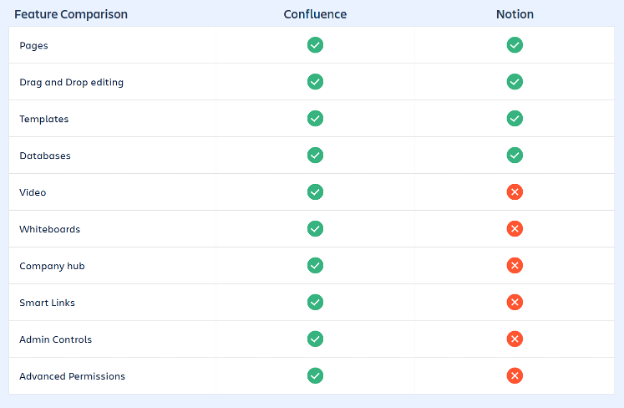
Notion vs. Confluence Comparison
Migrating from Notion to Confluence
Ultimately, the decision between Notion and Confluence comes down to scale, structure, and governance requirements. Notion is a flexible, intuitive workspace that is great for getting started quickly and adapting to many small use cases. But when teams grow in size, complexity, or compliance needs, Confluence becomes a more reliable home for organizational knowledge. With stronger audit trails, more granular permissions, enterprise authentication options, and deep integrations with tools like Jira, Confluence provides the structure that larger teams need to work coherently as one organization. As a result, many teams that begin with Notion discover that Confluence is the tool that helps them turn messy collaboration into lasting knowledge that scales with their goals. If you’re looking to migrate from Notion to Confluence, our team can help. Contact SPK’s team today to get a Confluence demo started.