
The ability to create clear, collaborative diagrams is a game-changer for increasing understanding across teams. Whether you’re mapping out a project workflow, whiteboarding a product architecture, or building a network diagram, having the right tool makes all the difference. Draw.io gives individuals this capability. From simple flowcharts to interactive system models, it empowers users at every level to visualize and communicate effectively. Additionally, it integrates with Atlassian tools, making it the perfect companion for Confluence and Jira. These users can easily centralize and secure their diagramming efforts. In this blog, we will explore how you can go from beginner to pro with draw.io using video tutorials, step-by-step guides, and expert support from SPK and Associates.
Key Features of Draw.io
As previously mentioned, draw.io is a free, open-source diagramming tool that enables individuals and teams to create and manage a wide variety of visual assets. These include:
- Flowcharts and process maps
- UML and ER diagrams
- Organizational charts
- Whiteboard sessions
- Network architecture diagrams

Draw.io offers an intuitive drag-and-drop interface as well as online and offline availability. It allows for real-time collaboration with shared cursors. While it integrates with Atlassian’s Jira and Confluence, it also offers integration with Google Drive. Its advanced formatting, layers, templates, and export/import options give users flexibility in creating the diagrams. Finally, draw.io includes a security-first design, making it perfect for enterprises needing compliance-ready documentation.
Draw.io for Beginners
If you are new to draw.io that’s no problem. This beginner video playlist guides you step-by-step through every aspect of the tool. These short, focused tutorials help you ramp up quickly.
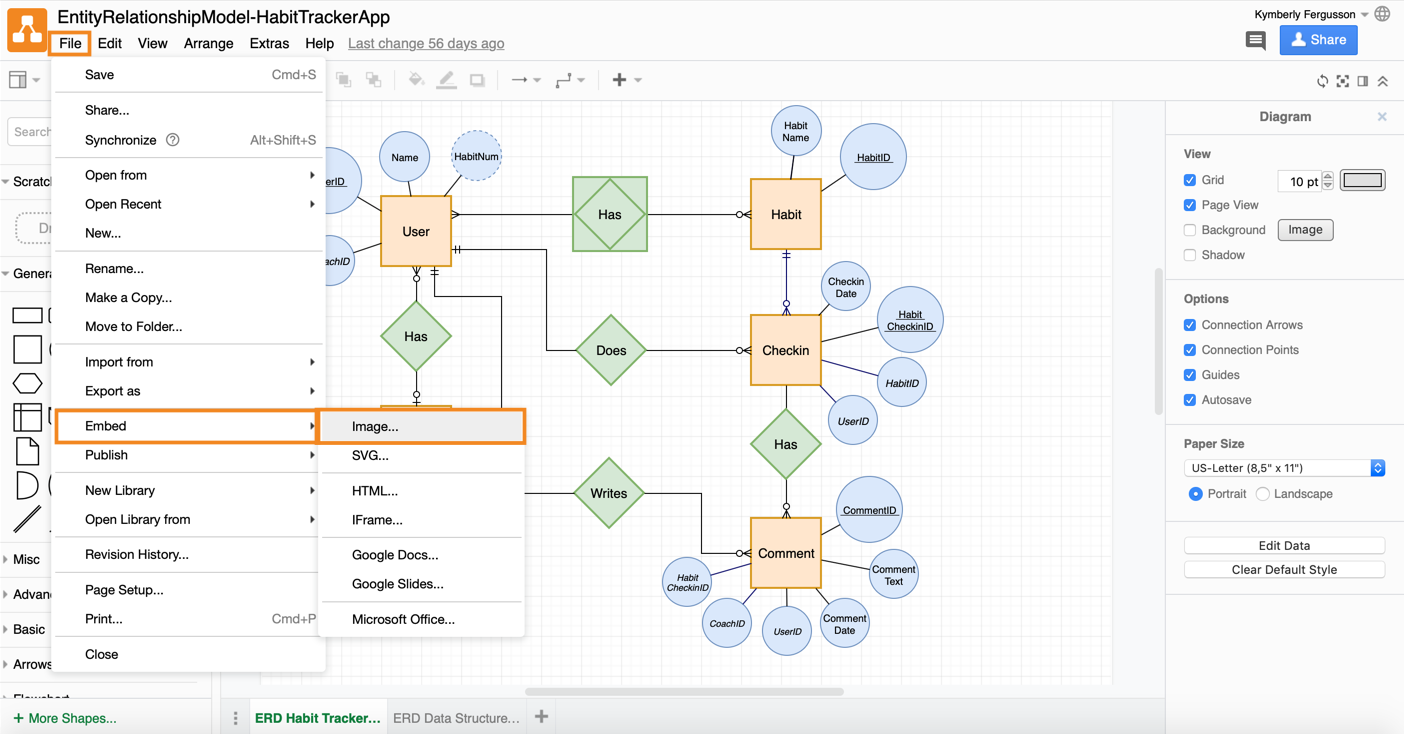
Watching the full playlist of draw.io tutorials will take you from the basics of diagramming in Confluence to mastering more advanced features with confidence. Beginners will learn how to navigate the interface, insert and manage diagrams using the draw.io macro, and quickly create and style shapes, text, and connectors. You’ll discover how to use templates, tool panels, and shape libraries to accelerate diagram creation. In addition to this, learn best practices for arranging, grouping, resizing, and rotating elements. You’ll also gain essential skills like saving, exporting to PDF, and accessing features like dark mode or color-blind-friendly design options.
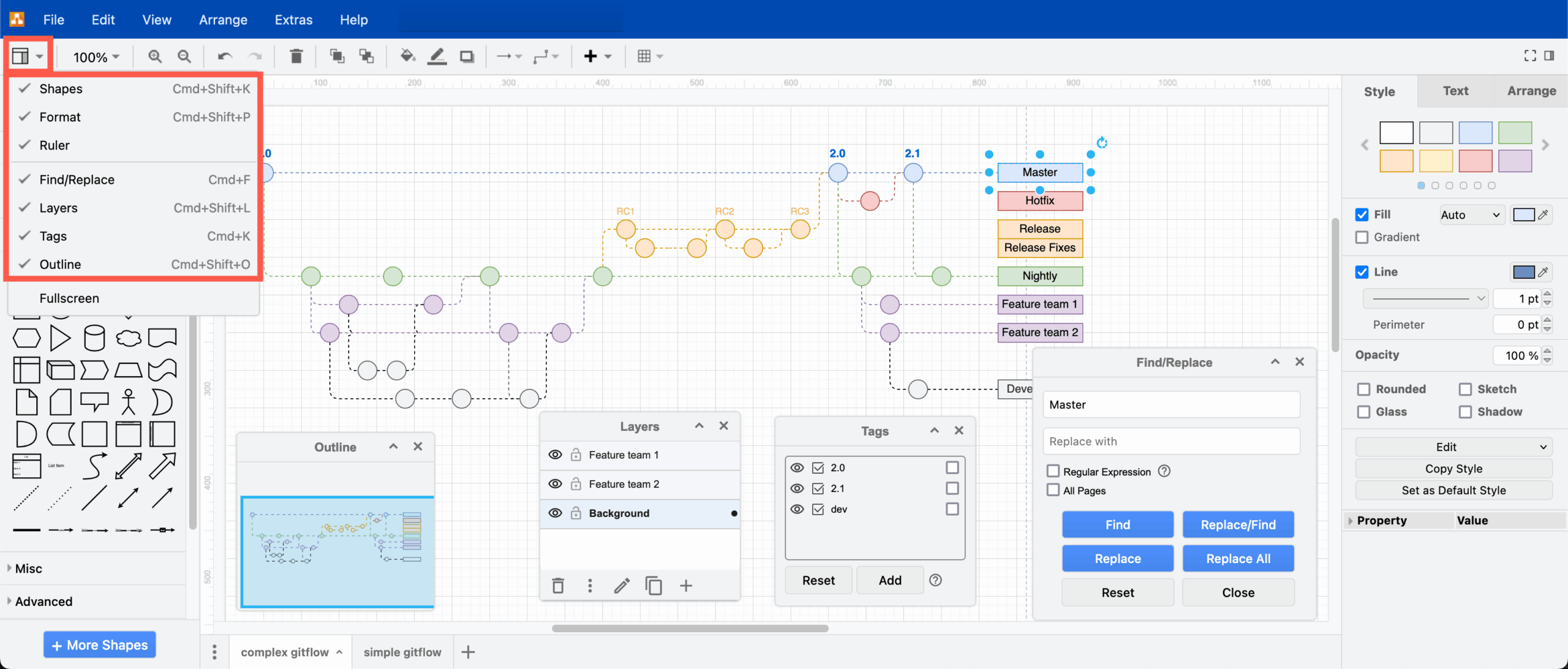
As you progress, the tutorials introduce pro tips and interactive tools that enhance your productivity and visual storytelling. You’ll explore advanced connector styling, label formatting, image embedding, and intuitive editing techniques on both Windows and macOS. The videos also display how to use whiteboarding features and provide accessibility tips to make your diagrams both functional and inclusive. Whether you’re creating flowcharts, technical architecture, or playful visuals, this video series equips you with the full toolset to build professional diagrams in Atlassian Confluence using draw.io. This playlist is perfect for users just starting out and covers basic functionality in both Cloud and Data Center environments.
Interactive Draw.io Tutorials and Step-by-Step Guides
Once you’re comfortable with the basics, draw.io’s interactive tutorials and step-by-step guides help you master advanced capabilities. These tips can help you turn your diagrams into strategic assets.
Step-by-Step Learning Tracks:
The step-by-step guides provided from Seibert include the following:
- Whiteboard Guide: Learn to use panels, layers, and collaborative tools for effective ideation
- Layers Guide: Organize complex diagrams with locked, ordered, and grouped layers
- Connectors Guide: Style, adjust, and perfect your diagram’s flow logic
- Interactive Shapes Guide: Create toggle buttons, interactive maps, and intelligent diagrams
These advanced tutorials are perfect for product managers, engineers, designers, and analysts looking to build dynamic, interactive diagrams inside Confluence or standalone platforms.
How SPK Can Help You Get Set Up with Draw.io
At SPK and Associates, we help teams unlock the full power of Atlassian tools, including draw.io for Confluence and Jira. Whether you’re new to diagramming or need enterprise-level support, SPK can help you implement draw.io in Confluence and Jira. We also provide training or we can set up secure, centralized diagram spaces for your teams. If you need help integrating draw.io with your workflows and existing tools, we’ve got you covered. Lastly, we can help your teams establish governance, version control, and best practices for visual documentation. Our hands-on experience with Atlassian tools makes us the perfect partner to help you turn draw.io into a competitive advantage
Mastering Draw.io
Whether you’re building flowcharts for your IT team, process maps for your operations group, or interactive whiteboards for brainstorming sessions, draw.io gives you the tools to visualize with clarity and precision. By following beginner tutorials, leveling up with interactive exercises, and working with SPK to integrate draw.io into your Atlassian stack, you’ll go from novice to expert in no time.
Ready to master draw.io? Explore the playlist, dive into interactive guides, and reach out to SPK and Associates to unleash the full power of visual collaboration in your organization.