Within
PTC Integrity, a viewSet is a collection of views that persist each time the user opens and closes the PTC Integrity Client. Integrity offers the ability for administrators to pre-configure viewSets for distribution throughout their local user communities. Using viewSets, administrators can provide a more custom experience for their users based on their tasks or roles within the PTC Integrity Client.
In this article we will take a look at how viewSets can be created and/or customized for your local users.
When it comes to creating a new viewSet it is always best to start with an existing viewSet, copy it, and perform any customizations on it you need to, before it is published on your production server. On the PTC Integrity Administration client, the ViewSet Distribution function will show a list of all of the available viewSets that have been published on the server as well as those that have been downloaded to the current desktop.
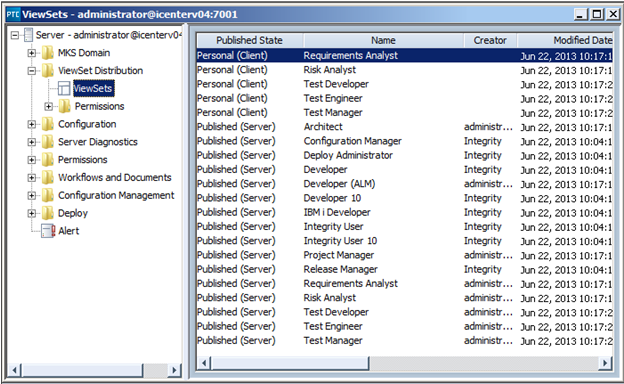
You can edit or create a copy of any of the existing viewSets shown in the image below by right clicking on the desired viewSet and making the appropriate selection:
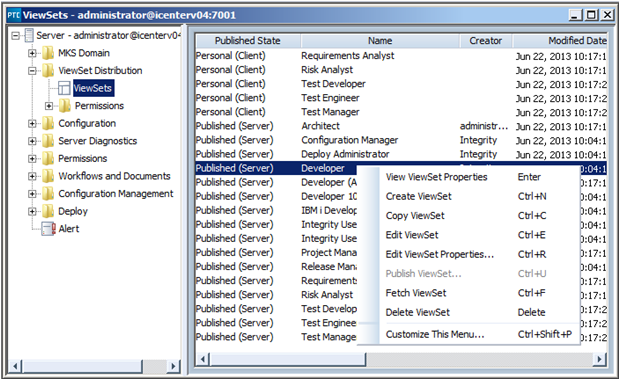
The Edit or Copy operation will create an unpublished copy of the viewSet and then open that copy in an Edit ViewSet window:
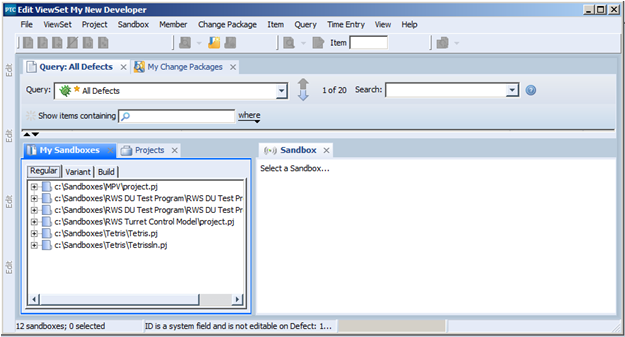
You can use this Edit ViewSet window to make any changes you need to the viewSet copy. When you are finished you can publish this viewSet by right clicking on the unpublished copy, and selecting Publish ViewSet:

The Publish ViewSet wizard will guide you through the steps necessary to publish the viewSet. You will be prompted to confirm such properties as:
- The Name of the viewSet
- The Description
- Whether or not the viewSet is optional or Mandatory (do users have to download it or not)
- Are the users allowed to customize the viewSet to meet their own needs
- The permissions
- A list of settings, the most important of which are server.hostname and server.port. Both of these properties should be blank if you are using a separate staging and production environment locked together. If these two settings remain selected users downloading them will find themselves logging into your Staging environment by default.

- When you are done with the various settings, selecting the Finish button will publish this viewSet to the PTC Integrity server, and make it available to the users of that server.
Note: If you prefer you can import a given viewSet directly to your regular PTC Integrity client make your changes to that viewSet, then using the operations described above copy and publish that viewSet.
Next Steps: