
Hybrid work has become the operating model for many modern organizations. Employees appreciate the flexibility, while leaders expect productivity. When it comes to IT teams, delivering productivity in a flexible environment without increasing risk or cost can be challenging. Traditional desktop models struggle to keep up with these demands, especially when teams are distributed, contractors are involved, and workloads vary dramatically across roles. This is where Azure Virtual Desktop changes the equation. By centralizing desktops and applications in the cloud, organizations gain the flexibility hybrid work demands while maintaining the control, security, and performance IT requires.
What Is Azure Virtual Desktop?
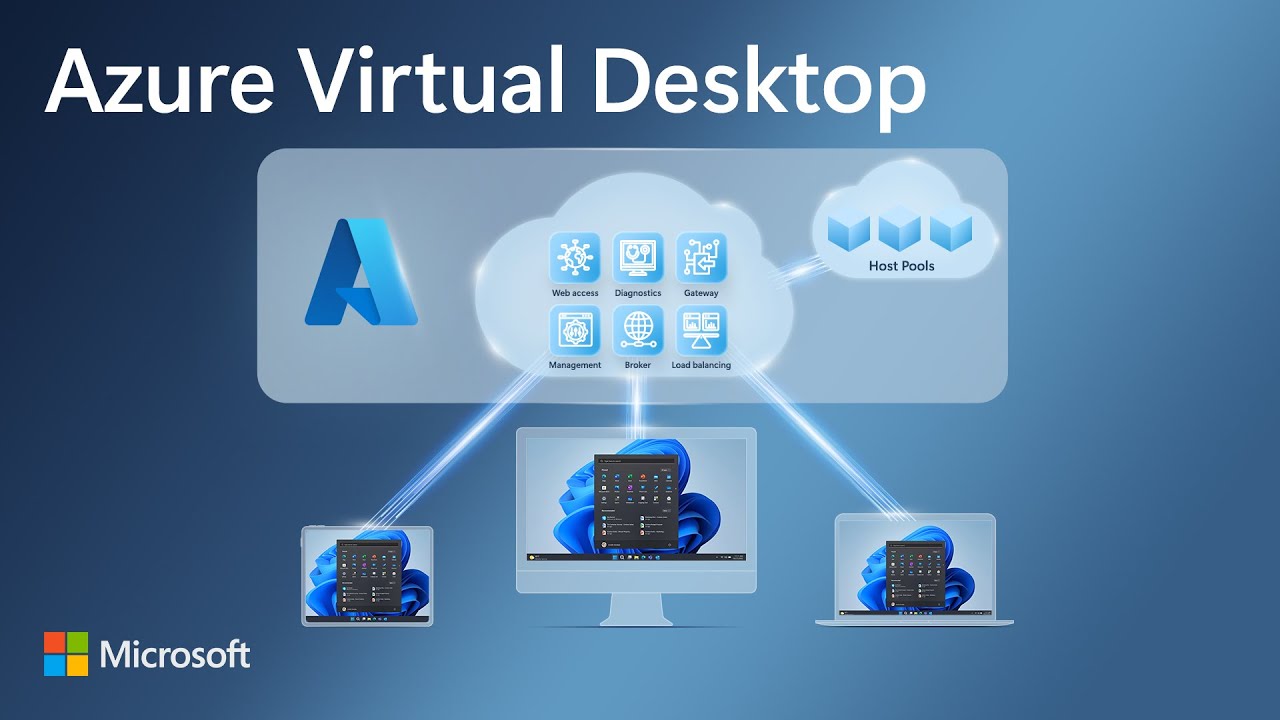
A virtual desktop is a remote, software-based desktop environment that runs in the cloud rather than on a local device. With Azure Virtual Desktop, users access a full Windows experience, applications, and data from anywhere using any internet-connected device. Azure Virtual Desktop centralizes IT management, keeps sensitive data in the cloud instead of on endpoints, and supports Bring Your Own Device policies without sacrificing security. It also allows organizations to tailor performance levels to different user needs, from basic office work to high-performance engineering or development workloads.
Five Reasons Hybrid Work Is More Effective with Azure Virtual Desktop
1. Keep Staff Productive with the Right Level of Performance
Not every employee needs the same computing power. Traditional IT models often force organizations to purchase expensive physical machines every three to five years to accommodate peak workloads, even if those resources are underutilized most of the time.
With Azure Virtual Desktop, performance is flexible and on demand. Power users can be assigned high-performance virtual desktops when running intensive applications. Meanwhile, users who primarily work in email, documents, or collaboration tools can run on lower-cost configurations. This ensures employees always have the performance they need without over-investing in hardware.
2. Maintain Full Control Over Configuration and Management
Azure Virtual Desktop gives IT teams centralized control over desktop configurations, user access, and application delivery. Using the Azure portal, administrators can manage host pools, user groups, and published resources from a single interface.

Multi-session capabilities allow multiple users to securely share the same virtual machine while maintaining performance and isolation. This reduces the total number of virtual machines required while still delivering a consistent, standardized experience to employees.

3. Enhance Security and Protect Intellectual Property
Security is one of the biggest challenges of hybrid work, especially when contractors or third parties are involved. With Azure Virtual Desktop, data stays in Azure rather than on local devices, dramatically reducing the risk of data leakage.
Organizations can restrict contractors and external users to working exclusively within virtual desktops, preventing local downloads or unauthorized access to sensitive files. Combined with built-in Azure security features, this approach protects intellectual property while also defending against external cyber threats.
4. Optimize Costs and Improve Efficiency
Azure Virtual Desktop follows a pay-for-what-you-use model. Organizations can leverage existing eligible Windows or Microsoft 365 licenses and reduce infrastructure costs by running multiple concurrent user sessions on a single virtual machine.
Autoscaling capabilities allow capacity to increase or decrease based on demand, time of day, or day of the week. This means you are not paying for unused resources, making virtual desktops a cost-effective alternative to traditional physical hardware and on-premises infrastructure.
5. Quickly Deploy and Scale as the Business Grows
Deploying traditional desktops can take weeks or months, especially for global teams. Azure Virtual Desktop environments can be deployed in minutes or hours, at virtually any scale, and in regions around the world.
As your business grows or project demands change, capacity can be adjusted automatically. This makes it easy to onboard new employees, support temporary project teams, or scale down when demand decreases, all without long procurement cycles.

Getting Started with Azure and SPK
Migrating to Azure Virtual Desktop requires thoughtful planning around performance, security, cost optimization, and user experience. SPK helps organizations design, deploy, and optimize Azure Virtual Desktop environments that align with business goals. From assessing workloads and licensing to implementing secure access models and ongoing optimization, we have you covered. Our experts will ensure your virtual desktop strategy supports hybrid work without introducing unnecessary complexity.
Hybrid Work with Azure Virtual Desktop
Traditional desktop models were not built for the flexibility, resilience, and security that hybrid work demands. Azure Virtual Desktop provides a modern alternative that adapts to changing workforce needs while giving IT teams the control they require. By improving productivity, strengthening security, optimizing costs, and enabling rapid scalability, Azure Virtual Desktop makes hybrid work effective. With the right strategy and the right partner, organizations can turn virtual desktops into a foundation for long-term business resilience. Contact SPK to learn more about what Azure Virtual Desktop can do for your business.