

Modern software development relies on version control systems to help teams manage changes, collaborate, and deliver high-quality code. Two popular Git workflows, Gitflow and Trunk-Based Development, offer different approaches to managing branches and releases. Discovering which is the right choice for your team can be confusing. In this post, we’ll break down what each workflow is, when it’s used, and why the best choice often depends on your team’s unique needs.
Gitflow vs. Trunk-Based Development
Gitflow
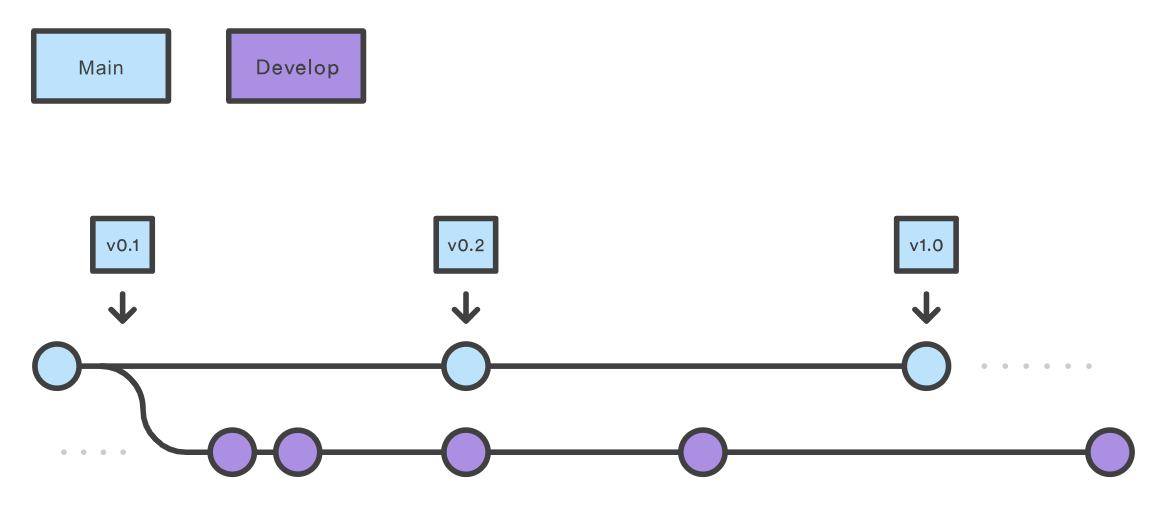
In 2010, Gitflow, a structured Git branching model was introduced. It was designed to handle multiple development streams and scheduled releases. Gitflow revolves around several persistent branches:
- Main (or Master): Stores official production-ready code.
- Develop: Serves as the integration branch for new features.
- Feature branches: Created from develop, merged back when complete.
- Release branches: Forked from develop for final preparation before production release.
- Hotfix branches: Branched directly from main to patch urgent issues.
This model separates development, staging, and production phases, which can help larger teams manage multiple versions simultaneously.
Trunk-Based Development
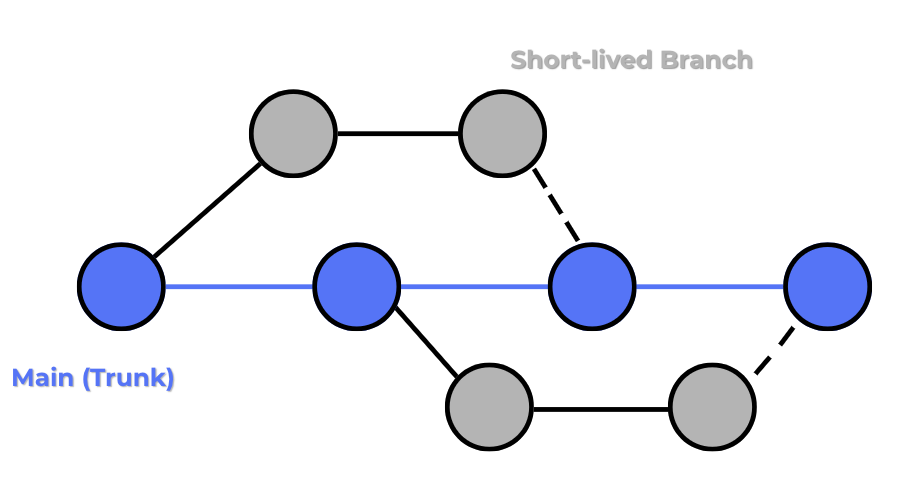
Trunk-Based Development (TBD) takes a simpler, faster approach. Here, all developers commit directly (or via very short-lived branches) to a single branch, the trunk or main. Developers integrate small, frequent changes multiple times a day. If work isn’t ready for release, teams use feature flags to toggle functionality on or off instead of creating separate long-lived branches. Trunk-Based Development enables Continuous Integration (CI) and Continuous Delivery (CD) by keeping the codebase in a deployable state at all times.
When Are Gitflow and Trunk-Based Development Used?
The biggest difference between these development styles is how teams manage parallel work and releases:
- Gitflow uses multiple long-lived branches to isolate features, releases, and hotfixes. It’s ideal when your team needs strict control over what goes into production, or when supporting multiple release versions simultaneously. It is common in projects with planned release cycles, large codebases, or where backward compatibility must be maintained.
- Trunk-Based Development encourages small, frequent commits to the trunk, making merging and integration easier. It’s best suited for teams practicing modern DevOps, where CI/CD pipelines and rapid iteration are critical. It thrives in fast-paced, agile teams that deploy frequently.
Pros and Cons of Gitflow and Trunk-Based Development
Which is Better: Gitflow or Trunk-Based Development?
With all of that said, neither development model is “better” overall. They each suit certain teams. If you’re managing complex software with multiple active versions and planned release cycles, Gitflow’s structured branching might be the best fit. If your team wants to move fast, integrate continuously, and ship updates frequently, Trunk-Based Development is likely the better choice. In the end, both workflows are proven approaches. The “right” choice is the one that matches your team’s size, culture, tooling, and release needs. Pick the model that supports your goals, keeps your codebase healthy, and helps you deliver value to your users. If you need help adopting the best Git workflow for your team, contact our experts.