
AI coding tools are quickly becoming part of everyday software development. Tools like Cursor, GitHub Copilot, GitLab Duo, and other AI assistants are helping developers generate code, complete repetitive tasks, and review pull requests. Software organizations are no longer questioning if they will use AI, but how the business can prove that AI is creating measurable value. That is where many companies are running into trouble. AI coding tools can be easy to adopt but difficult to govern. A team may see impressive usage numbers, but leadership still may not know whether those numbers translate into better productivity, lower costs, faster delivery, or improved quality. Finance teams may see a growing invoice without a clear explanation of what the company is getting in return. While engineering leaders may know that some developers are benefiting, they may not know whether adoption is broad, healthy, or tied to meaningful outcomes.
At SPK and Associates, we are seeing more organizations ask a practical question: How do we manage AI-assisted development in a way that proves value? The answer starts with better visibility. Software leaders need dashboards and reporting models that move beyond surface-level activity and connect AI usage to cost, adoption, team behavior, and business outcomes.
The Issue: AI Can Become Expensive Fast
AI coding tools are often positioned as productivity multipliers. In the right environment, they absolutely can be. They can:
- Help developers reduce repetitive work
- Speed up debugging
- Generate boilerplate code
- Summarize context
- Review pull requests
- Improve onboarding

However, without the right controls, AI can also become a fast-growing cost center. In my own experience, I have heard horror stories such as the following: an engineering director at a stealth startup shared that his organization was required to use AI coding tools, only to find that the cost ended up being roughly three times the salary cost of the people using them. That kind of experience is a warning sign for larger software organizations. AI adoption without measurement can quickly create budget surprises, especially when usage-based pricing, overages, inactive users, premium models, and unmanaged seats are involved.
The risk is not that AI tools are bad investments, but that companies approve the investment without building the reporting structure needed to understand it. A vendor invoice may tell you what was charged, but it does not tell you whether the spend was useful. It does not show which teams are gaining value, which users are inactive, which workflows are improving, or which usage patterns are driving unnecessary cost. For software leaders, AI coding ROI requires visibility, governance, and a clear connection between spend and outcomes.
Vanity Metrics
Many AI dashboards are filled with numbers that look impressive but do not help leaders make better decisions. These are vanity metrics. They may show that the tool is being used, but they do not explain whether the organization is getting value. Examples of vanity metrics include total AI lines generated, total messages sent, total completions, or total accepted suggestions. These numbers can be useful as raw activity signals, but they are not enough on their own. A high number of generated lines does not automatically mean better code. A large number of AI messages does not necessarily mean developers are more productive. In some cases, heavy usage may even indicate friction, confusion, or rework.
A stronger measurement model separates vanity metrics from leading indicators and decision metrics. Leading indicators help show whether adoption is real.
These may include:
- Active-user percentage
- Daily or weekly active users
- Acceptance rate
- Usage by development surface
- Agent usage
- Command usage
- Repeat usage over time
These metrics help engineering leaders understand whether teams are actually incorporating AI into their workflow or simply experimenting with it.

Decision Metrics
Decision metrics go further. These are the numbers leadership needs to manage budget, adoption, and ROI. Examples include cost per active developer, spend per team or business unit, percentage of the engineering organization actively using the tool, spend trend versus headcount, cost per accepted output, adoption by project, and usage tied to meaningful engineering outcomes.
This distinction matters because dashboards often overemphasize the first category. They show activity, but not value. A useful AI coding dashboard should help leaders answer practical questions such as:
- Is the team adopting the tool?
- Are we paying for users who are not using it?
- Which teams are getting the most value?
- Which AI workflows are actually being used?
- Are costs increasing faster than adoption?
- Are we seeing usage patterns that justify expansion?
- Are we seeing warning signs that require governance?
The goal is to give engineering, finance, and operations leaders the information they need to make better decisions.
Cost is Not the Number on the Invoice
One of the biggest mistakes organizations make is assuming that AI cost is simply the number shown on the vendor invoice. In reality, the invoice is only one piece of the story. A vendor dashboard may show current-cycle usage, but it may not provide enough historical context to evaluate ROI over time. If leaders can only see the current billing period, they cannot identify trends. They cannot tell whether spending is increasing because adoption is improving, because headcount is growing, because a few users are consuming more resources, or because inactive users are still generating costs.
Visibility
Historical visibility is essential because ROI is not a single snapshot. It is a trend. Leadership needs to see how spending changes over weeks, months, and quarters. Additionally, they need to compare that spend to adoption, team size, delivery velocity, and engineering outcomes.
Hidden Fees
There is also a reconciliation problem. In one AI usage dashboard project, the internally calculated number and the vendor’s number were off by approximately $200. The issue was not that the vendor was necessarily wrong. The issue was that some fees were not exposed through the API. That creates a trust problem when presenting numbers to finance. If a dashboard cannot reconcile back to the invoice, it needs a clear footnote explaining the gap.
This is especially important for enterprise organizations. Finance teams do not just want a chart. They want numbers they can trust. Engineering leaders need reporting that shows what is included, what is excluded, what is estimated, and what requires reconciliation.
The Cost of Inactivity
Another hidden cost is departed employees. In some environments, former employees may continue to appear in billing or usage data after they have left the company. Many analytics tools remove inactive or departed users from standard views, which can cause this cost to disappear from operational reporting even though it still affects the budget. A purpose-built dashboard should answer questions like:
- Who is still billing but no longer active?
- Which users have spent but no meaningful usage?
- Which seats should be removed, reassigned, or reviewed?
- Which teams are approaching their budget limits?
- Where are overages coming from?
This is why AI cost management needs more than invoice review. It needs operational visibility that connects users, teams, spend, limits, remaining budget, historical trends, and actual usage.
Person-Level vs. Activity-Level Attribution
Attribution is one of the hardest parts of measuring AI coding ROI. Many organizations start by assigning usage to individual people. That is useful, but it is not enough.
Person-level attribution can show which developers are using AI, who the power users are, who may need enablement, and who is driving the most cost. It can also help managers identify internal champions who are using AI effectively and can share best practices with the rest of the team. However, person-level attribution breaks down when developers split their time across multiple projects. One developer may work on a new product in the morning, support a legacy application in the afternoon, and review pull requests for another team later in the week. If all AI usage is attributed only to that person, leadership still may not know which project, product, or cost center benefited from the spend.
Activity-level attribution is more useful, but harder to achieve. Ideally, organizations would be able to attribute AI usage to a repository, project, ticket, feature, pull request, or workstream.
This would allow teams to answer much more meaningful questions:
- Which products are benefiting most from AI?
- Is AI helping with new development, maintenance, testing, documentation, or code review?
- Are we using AI on high-value engineering work or mostly low-impact tasks?
- Can we connect AI usage to Jira issues, GitLab merge requests, GitHub pull requests, or product delivery milestones?
- Where should we expand usage?
- Where should we reduce spend?
The best approach is often to mirror how finance already allocates labor. For example, new-product development is often treated differently from maintenance or support work. If finance already has a labor allocation model for developers, AI usage should align with that model instead of creating a completely separate attribution framework. This helps avoid confusion and creates a more credible ROI story. Instead of saying, “Developer A spent this much on AI,” leadership can begin to say, “This product team spent this much on AI-assisted development, and here is how that investment relates to delivery outcomes.”
Real Life Example: A Custom AI Dashboard from SPK
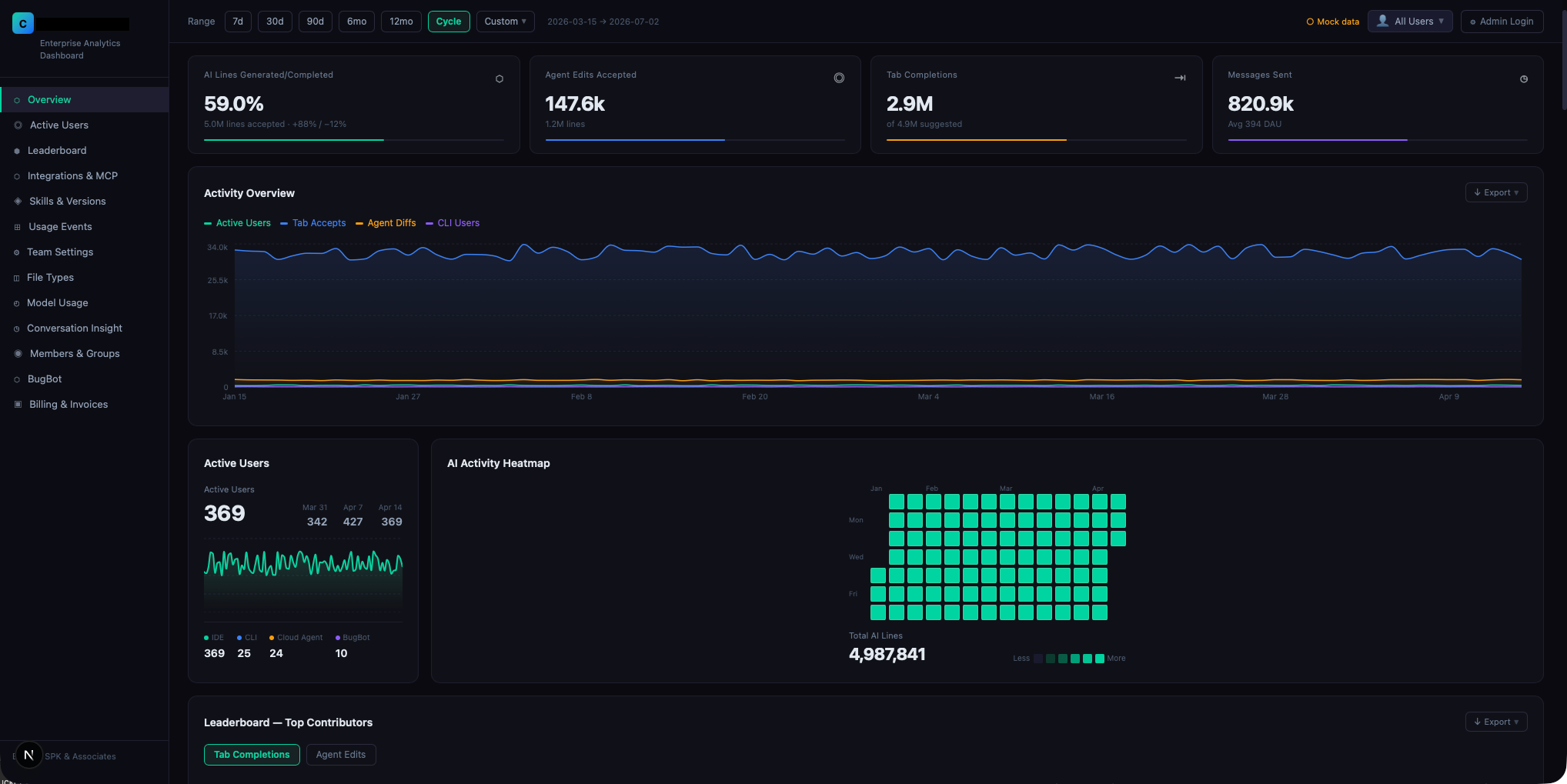
SPK recently created a custom Cursor AI usage dashboard for an enterprise R&D environment where managers needed better visibility into adoption, spend, and value. Cursor’s native dashboard provided some usage reporting, but it did not give leadership the level of detail needed to manage AI adoption across teams, users, billing groups, and engineering workflows.
The custom dashboard was designed around real stakeholder questions, not just raw API data. Instead of simply showing total usage, it organizes information into views that help different audiences make decisions. The overall dashboard covers several key topics:
Overview
At a glance, executives can see how Cursor is being adopted and used across the organization. This includes headline KPIs such as AI lines accepted, agent edits, tab completions, messages sent, active users, and usage trends over time. These metrics help leadership quickly understand whether the platform is being used and whether engagement is increasing or declining.
Active Users
Real adoption becomes easier to measure when teams can see how many people are using Cursor day to day and across which surfaces, such as IDE, CLI, Cloud Agent, or BugBot. This is important because license count alone does not prove adoption. A company may have hundreds of seats, but only a fraction of users may be active in a meaningful way.
Leaderboard
Power-user activity can reveal both opportunity and risk. The leaderboard helps managers identify internal champions, but it can also reveal unhealthy distribution. If only a few people are responsible for most usage, the organization may need more training, enablement, or workflow integration before expanding the investment.
Integrations and MCP
Toolchain visibility is especially important as organizations connect AI to more systems. Reporting on integrations and MCP usage shows which tools and MCP servers are actually being used. This helps platform teams understand which integrations are valuable and which may not be worth maintaining. For organizations investing in AI-enabled development environments, this is an important part of rationalizing the toolchain.
Rules, Commands, and Tools
Structured AI usage is often where teams begin to see more repeatable value. By tracking rules, commands, and tools, leaders can understand whether developers are using standardized workflows, slash commands, and internal rules or simply interacting with AI in an unstructured way. AI value often improves when teams standardize prompts, commands, rules, and workflows around their actual engineering process.
Daily Usage
Per-user usage patterns can help managers and finance teams understand where AI is creating value and where spend may need attention. Daily usage rollups can include requests, lines added, tab completions, acceptance rate, and preferred model. This makes it easier to evaluate spend per person and identify usage patterns that may require follow-up.
Analytics
A deeper breakdown of usage by file type and language helps clarify where AI is actually being applied. This can answer whether Cursor is supporting core engineering work or mostly being used for documentation, configuration files, or lower-risk tasks.
Conversation Insight
Usage volume only tells part of the story. Conversation insight looks at what kinds of work developers are using AI for, such as coding, reviewing, debugging, planning, or guidance. This gives leadership a better understanding of usage quality, not just activity level.
Members and Groups
Larger organizations need reporting that reflects how their teams are actually structured. Members and groups make it possible to segment reporting by teams, roles, billing groups, or custom analytics groups. This is critical because leaders rarely want only a whole-company view. They want to filter by business unit, product team, cost center, or engineering group.
BugBot
Automated pull request review should be measured by whether it is improving quality, not just whether it is running. BugBot reporting helps leadership evaluate whether automated reviews are finding real issues and contributing to better engineering outcomes. This can include PR-level review counts, issue breakdowns, and severity insights.
Billing and Invoices
Spend visibility is critical when AI usage can scale quickly across teams. Billing and invoice reporting gives finance and admins a practical view of cycle-start date, total cycle spend, on-demand spend, average spend per member, budget utilization, top spenders, limits, remaining budget, and usage percentage. This helps answer the question, “Should we be worried about overage?”
The custom dashboard also goes beyond raw API data in several important ways. It caches historical data so leaders can see longer-term trends instead of being limited to short vendor reporting windows. Additionally, it reconstructs per-user budget limits where the API does not directly expose them. It also reframes spend into remaining budget, which better matches how managers think about cost. Furthermore, it supports date range filters, user filters, analytics groups, and billing groups, so every section can be viewed through the lens of the stakeholder asking the question. This is the kind of reporting organizations need as AI coding tools become enterprise-standard. The value is not just in collecting data, it is in translating that data into decisions.
How to Maximize AI Coding ROI
Measuring AI coding ROI is only the first step. Once organizations have visibility, they can start improving the return.
First, organizations should define how AI value will be measured. Before expanding AI adoption, leaders need to define what value means for the business. For one organization, that may mean faster feature delivery. For another, it may mean reducing repetitive work, improving code review coverage, or accelerating onboarding. From there, teams should track active usage so they can connect AI investment to real engineering outcomes.
Second, companies should manage costs at the team and user level. Budget owners need to see who is using the tool, who is not, who is consuming the most, and where spend is trending. This helps prevent surprise costs and supports smarter license management.
Third, organizations should create enablement around high-value use cases. If the dashboard shows that AI is mostly being used for low-impact tasks, leaders can introduce better workflows, prompts, rules, and integrations. This turns AI from a general assistant into a more strategic part of the engineering process.
Fourth, software teams should connect AI usage to existing systems of record. Jira, GitLab, GitHub, Azure DevOps, service management platforms, and PLM or ALM systems can provide important context around work, tickets, pull requests, releases, and outcomes. The more AI usage can be connected to these systems, the more credible the ROI story becomes.
Finally, organizations should review AI usage regularly. AI coding tools are evolving quickly, and usage patterns can change fast. Monthly or quarterly reviews can help leadership decide whether to expand, adjust, retrain, reallocate, or reduce spend.


Measuring and Maximizing AI Coding ROI with SPK
AI coding tools can create meaningful value for software teams, but only when organizations have the visibility to manage them. The companies that get the most value from AI-assisted development will be the ones that treat it like an operational investment, not just a developer productivity experiment. That means building dashboards that answer real business questions, reconciling spend to finance, identifying hidden costs, segmenting usage by teams and workflows, and tying AI activity back to engineering outcomes. SPK and Associates helps software and engineering organizations build the systems, dashboards, integrations, and governance models needed to manage AI adoption responsibly. Whether your team is using Cursor, GitLab Duo, GitHub Copilot, Atlassian Rovo, or another AI platform, SPK can help you move beyond vendor dashboards and build the visibility needed to measure and maximize AI coding ROI.