
We’ve all seen the headlines: “AI is the future of work,” “AI will automate all your tasks,” “AI is coming for your job.” However, for teams deep in engineering, product, support, and business operations, the truth is more subdued. Instead of fear-mongering, teams should ask: How do we make AI actually useful in the places we collaborate every day? How do we avoid adding yet another app or distraction? And how do we ensure that when we adopt AI, it improves productivity rather than undermines it?
That’s where contextual AI comes in. AI that doesn’t just answer questions but understands your team’s context, connects across the systems you already use, and takes action in your workflow. When done right, AI becomes less of “a tool to use” and more like “a teammate you work with.”
In this blog, we’ll explore why contextual AI is emerging as the future of team collaboration and efficiency, and how two leading platforms, Atlassian’s Rovo and GitLab’s Duo Agent Platform (including Duo and Duo+), illustrate what that future looks like in practice.
What we mean by “Contextual AI”
Effective AI for teams isn’t about throwing a chatbot on top of a stack and hoping for magic. It’s about:
- Context: The AI knows what project you’re talking about, what team you’re on, what tools you use, and what your past work has been.
- For example, Rovo can scan multiple Atlassian tools (Confluence spaces, Jira projects), and outside systems such as SharePoint and then execute tasks across them.
- GitLab Duo Agent Platform similarly gives agents full context of your codebase, issues, CI/CD pipelines, and history.
- Action: It should do more than answer. It should execute: update documents, send emails, comment on pull requests, create tickets, and automate approvals.
- Rovo: “With more actions, Rovo can now help you get more work done directly inside your favorite apps… Without switching apps or digging through more work.”
- GitLab Duo: “You assign one AI agent … while you focus on architecture decisions …”
- Integration & Flow: Rather than being a bolt-on, effective contextual AI plugs into your tools and workflows so that the barrier for adoption is low, and the disruption to flow is minimal.
- Memory & Adaptation: The system learns your context, preferences, and team dynamics and evolves, rather than always starting from zero. Rovo’s “persistent memory” feature is a clear example.
In short: Contextual AI is not just chat + prompts. it’s prompt + context + action + integration. This is why it is shaping the future of collaboration.
Why Team Collaboration & Efficiency Need This
Teams face a number of chronic friction points:
Multiple tools and app-switching. Engineers, product managers, support folks, and business users toggle between chat, email, docs, project tracking systems, code reviews, and more. Each extra click or context switch costs time, attention, and momentum.
Fragmented context. A decision in Slack may not be captured in Confluence. A code review may not reference the original requirement in Jira. Over time, the team loses “what we decided, why, and where the work is.”
Admin work. Manual handoffs, waiting for someone to pull data, summarize status, create tickets, follow up… the administrative burden grows. Some estimates show that between 10-40% of developer time is administrative work, not innovative, knowledge worker-focused work.
Lack of visibility. Stakeholders can’t quickly answer “What’s the status of X?” or “What did we learn from last sprint’s release?”
Talent retention & morale. Developers in particular complain when they spend too much time on repetitive or administrative work rather than creative code, solving problems, collaborating, and innovating. When the tools feel like obstacles, frustration grows.
Contextual AI addresses those problems. By embedding intelligence directly into your workflows:
- Contextual prompts plus integrated agents mean fewer app switches.
- The AI holds and remembers the context. Thus, teams don’t need to repeat or recreate context.
- Routine tasks can be delegated to the AI. For example, summarize feedback or schedule a follow-up email, or create a Jira task. Doing this allows humans to focus on high-value work.
- Because the AI operates in the tools teams already use (Confluence, Jira, GitLab, IDEs), visibility improves, and stakeholders see a more transparent flow.
- With less friction, developers stay in flow more often, interruption is reduced, productivity improves, and ultimately, team satisfaction improves.
Spotlight on Rovo
Atlassian’s recent blog post on Rovo describes how the offering has evolved into a true contextual AI teammate. Key aspects:
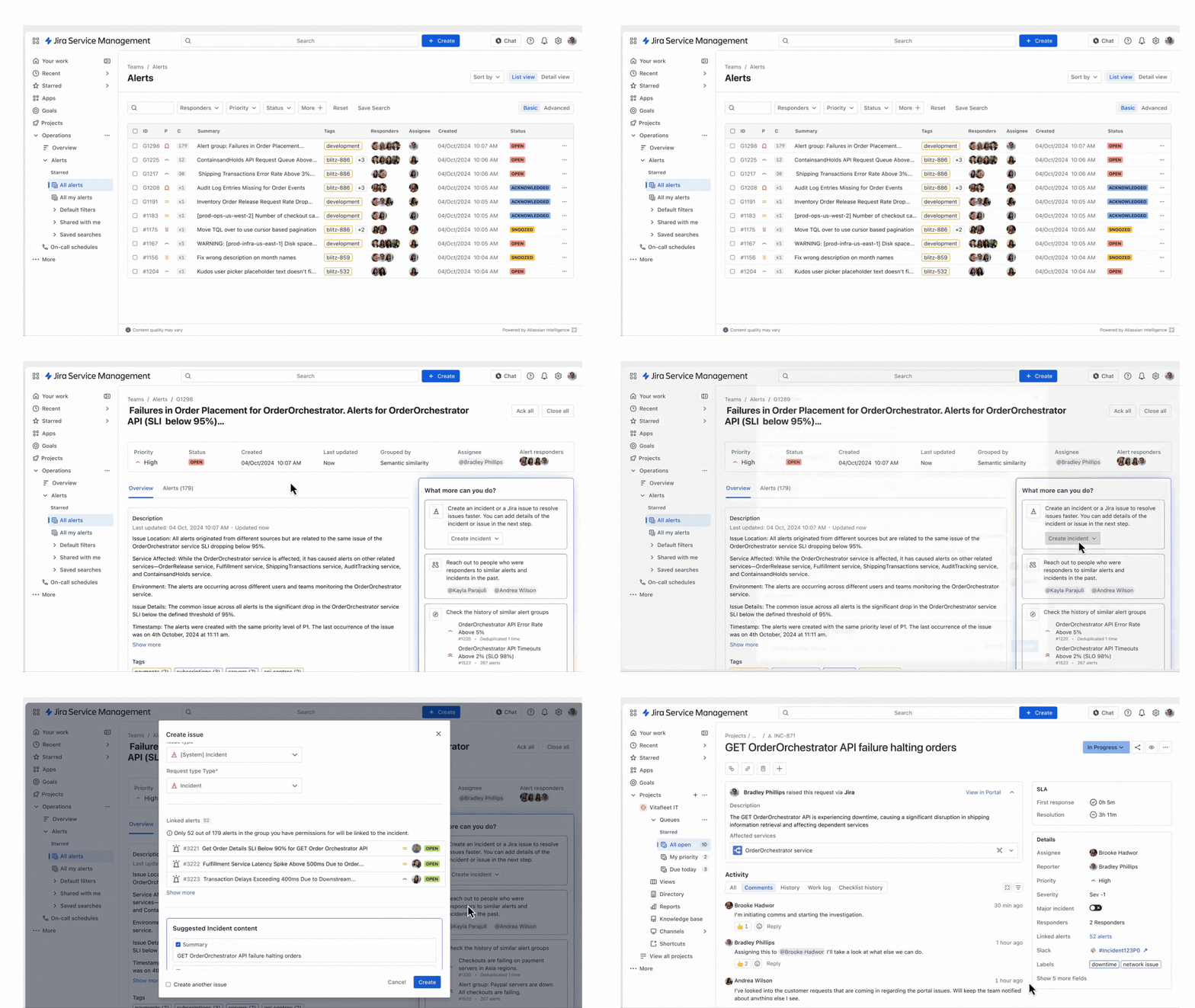
- Multistep tasks: Rovo can take a prompt like “Find our latest customer feedback in Confluence space X and Jira project Y, summarize themes, share with the product team in Slack channel #abc-xyz” and execute that entire sequence without manual handoffs.
- Persistent memory: Rovo now maintains memory of organizational context, user context, and team context, so you don’t need to repeat “which Alice” or “which project”.
- Action across apps: It’s not limited to Atlassian’s own ecosystem. It can connect to Google Drive, Outlook, Teams, Slack, SharePoint, and more.
- Doing work: This evolution reflects how AI is shifting from static “help me answer a question” to “help me do the work”. For teams using Atlassian tools, Rovo is a clear example of what contextual AI enables.
For engineering, product, and business teams: imagine pulling insights from your backlog, summarizing release status, updating documentation, and triggering follow-ups across systems all from a single prompt. That’s the kind of efficiency boost contextual AI delivers.
Spotlight on GitLab Duo / Duo+
GitLab is also seeing huge value for engineering and DevSecOps teams with the Duo Platform (and its various add-ons: Duo, Duo Pro, Duo Enterprise). Key features:
- Agentic AI across the full dev lifecycle: Not just code suggestions but orchestration of tasks like planning, code generation, test generation, security vulnerability handling, code review, CI/CD workflows.
- Full context: Agents operate with access to project context: codebases, issues, merge requests, CI pipelines, etc. The more your team uses GitLab end-to-end, the richer the context becomes.
- Customize your agents: You can tailor the agents’ behavior (via slash commands, custom rules) so they match your team’s coding standards, workflows, and preferences.
- Seamless integration with developer environments: Duo works inside IDEs (VS Code, JetBrains) as well as the GitLab web UI. Minimizing interruptions and context switching.
For engineering and platform teams, this means: you’re no longer just using AI tools, you’re embedding AI agents into your workflows so work becomes smarter, faster, and more aligned with your standards. The benefits in developer productivity, code quality, and team throughput can be substantial.
How Prompts + Agents Fit Into Collaboration
Often, when people talk about AI at work, they focus on “what prompt should I use?” or “which model should I pick?” Those are important, but in team collaboration, the real leap comes when you elevate from simple prompts to agent-driven workflows. Here’s how:
1. Prompt: A user writes a natural-language request (e.g., “Summarize last week’s customer feedback and update the product roadmap doc”).
2. Context: The agent knows where your feedback lives (Confluence, Jira), the relevant project, team, previous roadmap versions, and stakeholder expectations.
3. Action: The agent parses the prompt, breaks it into tasks (collect data → summarize → update doc → notify team), executes them across systems, and surfaces the final result.
4. Feedback & Memory: The agent remembers that this user wants updates by Tuesday every week, prefers bullet summaries for product leads, and should link to the GitLab project ABC. Next time, it will anticipate those preferences.
This cycle is what makes contextual AI powerful for collaboration: humans focus on intent and decision-making; agents handle the routine, context-rich, cross-tool execution. When teams adopt this pattern, productivity improves, alignment increases, and cross-team handoffs get quieter (less “did you get my email?”, less “which doc shall we use?”, less “why didn’t the ticket get created?”).
Why Teams That Embrace Contextual AI Will Win
Here are three key advantages:
Speed with precision: Because agents are context-aware and integrated, teams get faster responses and fewer errors. That means less time waiting and more time doing.
Better collaboration & alignment: When everyone works in the same ecosystem, talking the same “agent language”, context is shared. Decisions, documents, code, feedback—all stay connected.
Improved developer experience: Developers hate interruptions and context switching. When the AI agent steps in and handles the scaffolding work, developers can stay in flow, focus on creative technical work, and feel more valued. That supports retention and morale.
If your team is experimenting with AI but still feels like the stack is brittle, the workflows are disconnected, and people are still manually gluing things together, contextual AI is the shift you need to consider.
Getting Started — Practical Steps for Your Team
Here’s a simple roadmap for embracing contextual AI in your team:
- Audit your context sources: What systems does your team currently use? (e.g., Jira, Confluence, GitLab, Slack, email, calendars). Map where important decisions live, where reviews happen, where updates are recorded.
- Choose your agent platform:
- If you’re using Atlassian tools broadly (Jira, Confluence, and Slack/Teams integration), then Rovo Chat is a strong choice.
- If your team is engineering-centric, using GitLab end-to-end, then GitLab Duo/Duo+ is purpose-built for DevSecOps.
- Define key workflows: Identify 2–3 high-value workflows that are repetitive, cross-tool, and painful. Examples: release summary, bug triage, customer feedback summarization, security vulnerability review.
- Deploy your agents: Configure or enable agents for those workflows. Train them with your context (project names, teams, codebase location, docs). Use prompts that mimic how teams speak.
5. Measure the impact: Track metrics like reduction in context switches, time to update docs, time developers spend in flow, and cycle time for tasks. Adjust and iterate.
6. Scale and evolve: Over time, expand to more workflows, add custom rules, refine memory, build new agents, and integrate more systems. Make AI a part of the team fabric.
Your Contextual AI Next Step
We’re moving from a world where AI is an add-on to a world where AI becomes woven into how teams actually collaborate. Contextual AI is the future of collaboration and efficiency. Platforms like Rovo and Duo are harbingers of that future: showing how prompts, agents, context, and action come together to make teams smarter and faster.
If you’re still waiting to see how AI should fit into your collaboration stack, contact our team today. Our AI Launchpad service is purpose-built for outcomes like what is discussed in this blog.